A walkthrough of the app and your account. The common questions come first; the full reference follows, with its contents beside it.
From buy to first landing in five minutes.
BuyRoundout from the pricing page. Checkout runs through Paddle.
Receive a receipt email and a second email with your licence key. The key is also in PortalLicences when you sign in.
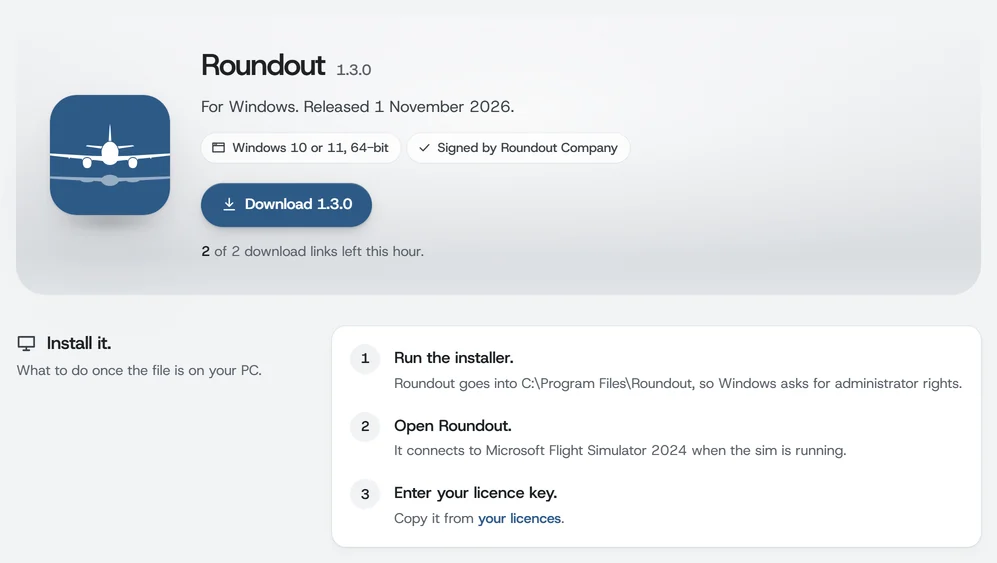
Download the latest installer from PortalDownloads.
Install: Roundout goes into C:\Program Files\Roundout. Nothing is copied into MSFS itself; Roundout runs as a standalone Windows app.
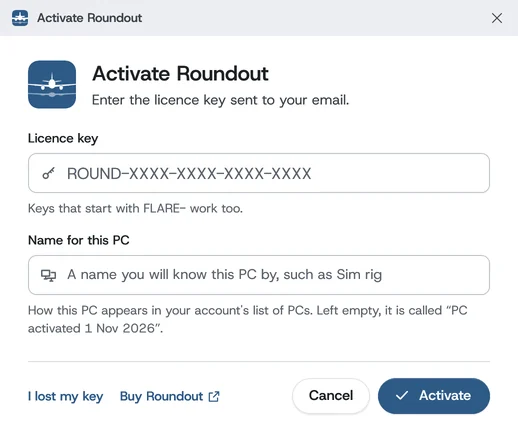
Activate: launch Roundout, paste your key, name the PC and click Activate.
Buying a licence
Open the pricing page and click Buy Roundout. If you're not signed in, the buy page first creates your account (or signs you in) and confirms your email with a 6-digit code, so the order links to your account. The price includes tax or VAT in most countries. In a few it's added, and the checkout shows it before you pay. Paddle handles the card or PayPal payment and emails you the receipt, with the tax or VAT for your country on it. Once Paddle confirms the payment, your licence is issued and a second email goes out with the key.
Install and first run
Sign in to the customer portal, open PortalDownloads, grab the latest installer, and run it. The installer:
Installs Roundout under C:\Program Files\Roundout, which needs administrator rights. You can change the folder when you first install, and an update from FLARE stays in the folder FLARE used.
Nothing else to install: everything Roundout needs comes with it, and the program is Roundout.exe, so Task Manager and the Start menu say Roundout. A small FLARE.App.exe beside it only opens Roundout from old shortcuts.
Adds Start Menu and desktop shortcuts and sets Roundout to launch automatically when MSFS 2024 starts; the entry it adds to MSFS is named Roundout. Each is a checkbox you can untick during setup, and the MSFS launch can be changed later in SettingsSimulator (Start Roundout when MSFS 2024 starts).
The installer, Roundout-Setup- followed by the version, is signed by Roundout Company, so Windows names us as the publisher. For a brand-new release Windows SmartScreen may still ask before running it; choose More infoRun anyway. You can also check the file against the checksum on the Downloads page.
Portal, Downloads: the latest installer, signed by Roundout Company, and the three steps that follow it.
Apart from that optional start-up entry, Roundout adds nothing to MSFS. It runs as a separate Windows app and talks to the sim through Microsoft's SimConnect SDK. No Community-folder add-ons, no Marketplace install.
Updates
Roundout checks for a new version when it starts and every few hours while it runs. When there is one, a banner at the top of the window offers it. Click Update now and Roundout downloads it in the background and checks it against its checksum. When the download finishes, click Install now: Roundout closes, installs the update and opens again. Your licence, settings, desktop shortcut and landings (under %LOCALAPPDATA%\Roundout) stay exactly as they are. Install now waits while you are landing or taking off.
Update now downloads the new version in the background; Install now closes Roundout, installs it and opens it again.
Nothing to move by hand if you updated from FLARE. The first start of Roundout moves your licence, landings, settings, navdata and logs from %LOCALAPPDATA%\FLARE to %LOCALAPPDATA%\Roundout by itself.
Remind me later hides the banner until Roundout next starts. To check at any time, open SettingsHelp and updates and click Check for Roundout updates. The version you're running is shown there.
Activation
Your key looks like ROUND-XXXX-XXXX-XXXX-XXXX. Keys that start with FLARE- work just the same: every key sold before the new name, keys bought from a reseller, and the keys that later replace them. Paste it into the activation window. Capitals, spaces, line breaks and dashes don't matter. The key never uses the look-alike letters I, L, O and U, so if you type one of them by mistake (O for 0, I or L for 1, U for V), Roundout reads it as the right character when you click Activate.
Give the PC a name you will know it by, for example Sim rig (left empty, it is called “PC activated” and the date), and click Activate. If activation fails, see Activation errors below.
Paste your key, give the PC a name you will know, and click Activate.
A key that isn't linked to an account yet, such as one bought from a reseller, has to be claimed first: Roundout says Claim this licence first. Click Open the claim page, sign in or make your account, then click I have claimed it, try again.
A Windows app beside the sim.
A standalone Windows window, not a sim add-on. It talks to MSFS 2024 over Microsoft's SimConnect SDK and runs in user space, with no kernel hooks. Two jobs: capture and grade landings, and (unless you turn it off) sync them to your account.
The window works well on a second monitor, and you don't need one. It never competes with MSFS for cockpit real estate, so your EFB, panels and views inside the sim stay untouched. It shows live data while you fly. As you roll out after touchdown, the score card you chose opens over the sim with your grade: see the score card for the choices, and for Off. The full breakdown is in the Landing report.
The app's pages
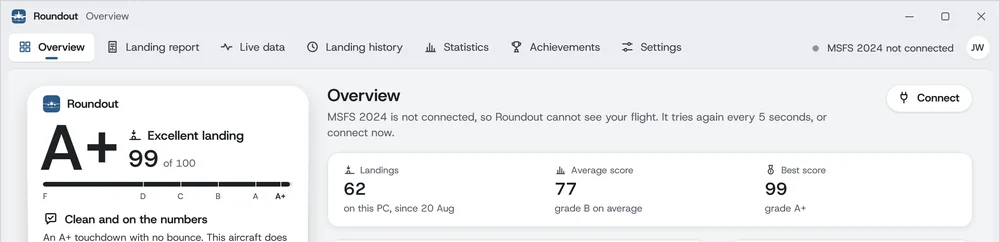
The menu along the top of the window holds every page: Overview, Landing report, Live data, Landing history, Statistics, Achievements and Settings. Its right end shows whether Roundout is connected to MSFS 2024. Make the window larger and each page uses the room. Any text that's cut short shows whole when you hold the pointer over it.
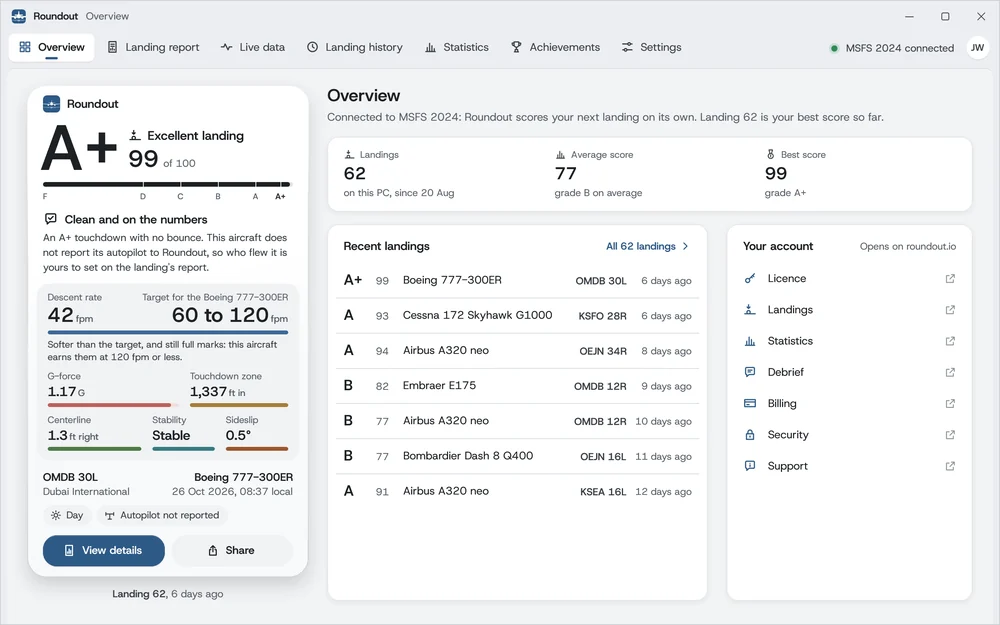
The Overview, where Roundout opens.
Overview
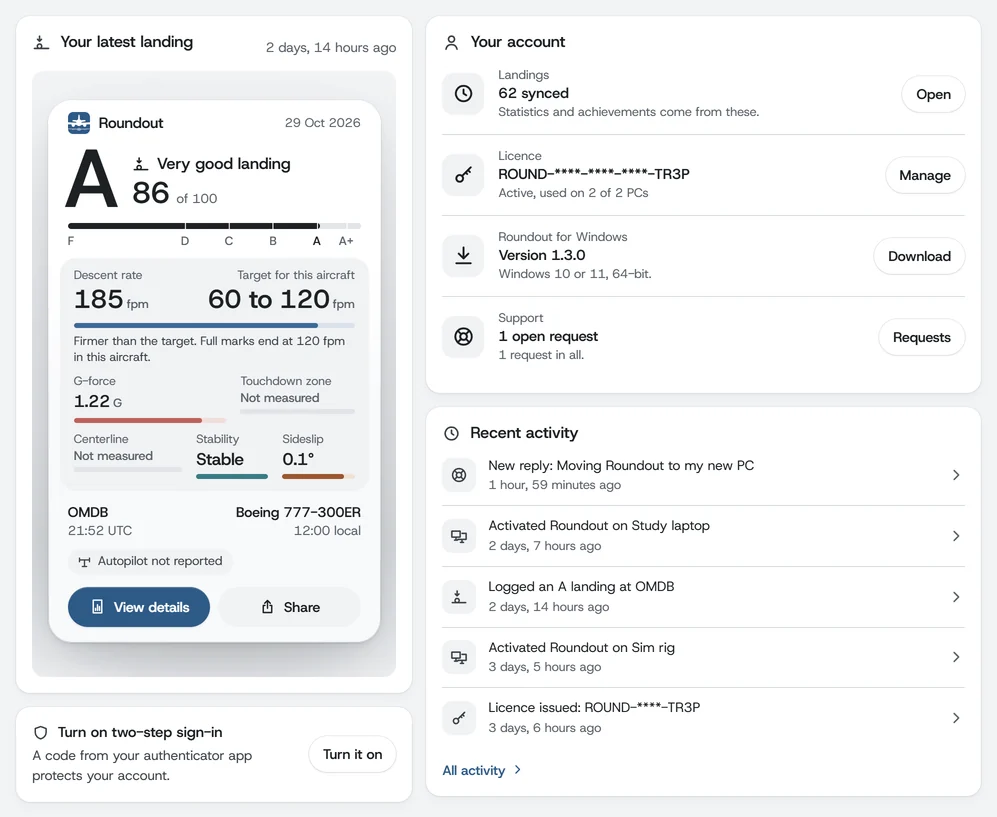
Your last score card, how many landings you've flown with your average and best score, your recent landings, and links to your account on roundout.io. Until it reads the sim it says so and offers Connect.
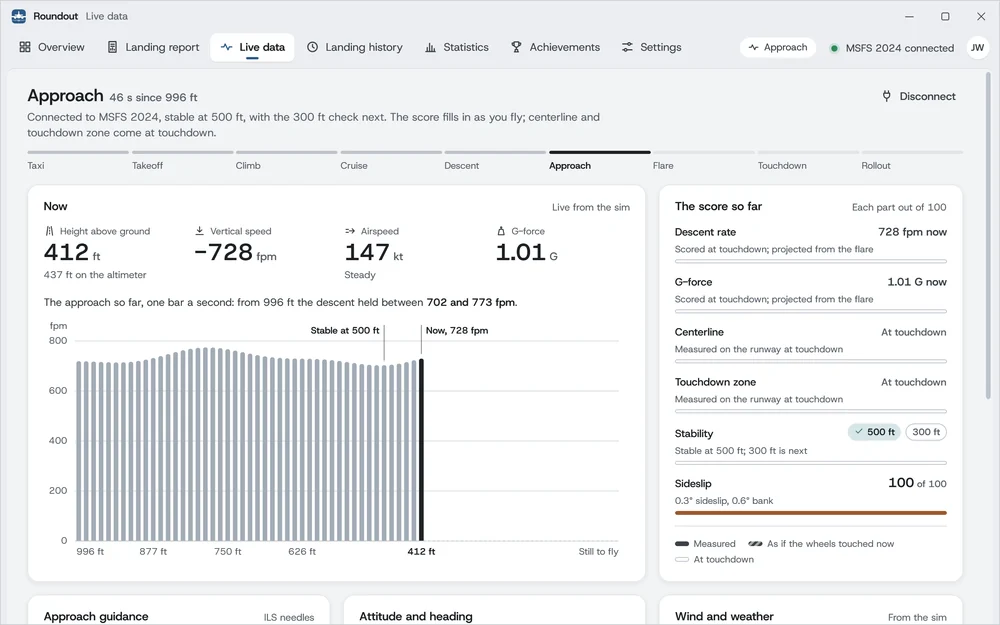
The flight as it happens: its phase from taxi to rollout, height, vertical speed, airspeed and G-force, the approach so far one bar a second, the score so far, the ILS needles, attitude and heading, wind and weather, configuration and automation.
Landing history
Every landing on this PC, filtered and ordered as you like. See local logbook below.
Statistics
Your figures Overall, By category, By airport and By aircraft: scores, descent rates, G-force, grades, wind records, each landing's descent rate against its aircraft's target, and the share of A+ landings in each of the last 12 months.
Achievements
Every achievement, with how far along you are, and Aircraft mastery for each aircraft family.
Settings
Opens on General, with tabs for Simulator, Account and licence, Data, and Help and updates. Save settings keeps what you changed; leaving with changes unsaved asks first. General also holds the units: Use metric units shows metres per second instead of feet per minute.
Live data on final. The score fills in as you fly; centerline and touchdown zone come at touchdown.
Landing capture and scoring
Every touchdown is detected automatically. No button to press. For each landing, Roundout captures:
Touchdown frame
Vertical speed (fpm), G-force, pitch, bank, heading, sideslip, indicated and ground speed, latitude and longitude, and your landing weight.
Approach trace
From 1,000 ft above the ground through the rollout: height, vertical speed, airspeed and ground speed, pitch, bank, heading, sideslip, G, wind, flap, spoiler, throttle and brake positions, gear contact and autopilot modes, plus the stability checks at the 500 ft and 300 ft gates. Raw data in the Landing report saves it, with up to ten readings a second.
Flare envelope
Flare start height, flare duration, peak pitch rate, pitch at the start of the flare and at touchdown, float distance.
Rollout
Bounce count, worst-bounce G, stopping distance, reverse-thrust and spoiler usage.
Context
Aircraft, airport ICAO, runway, runway length and heading, wind, headwind and crosswind components, approach type (ILS, RNAV/GPS, VOR or Visual, detected automatically even on study-level add-ons that don't share radio state; you can change it from its menu in the Landing report), time of day, the sim's weather at touchdown and the real-world METAR report for the airport.
Coaching
Up to five notes from The coach in the Landing report: what went well and what to work on, from the approach and flare to the touchdown and rollout. Your approach speed is judged against a Vref adjusted for the weight you landed at, when the sim reports it. The notes are fixed when the landing is captured and sync to your account with it.
Each landing is graded A+ to F. Sub-scores cover descent rate, G-force, centerline accuracy, touchdown-zone position, approach stability and sideslip, with bounce and tail-strike penalties and a crosswind bonus. Thresholds adjust by aircraft type: a 737 isn't expected to land like a Cessna. The full breakdown is in landing scoring and the aircraft profiles catalog below.
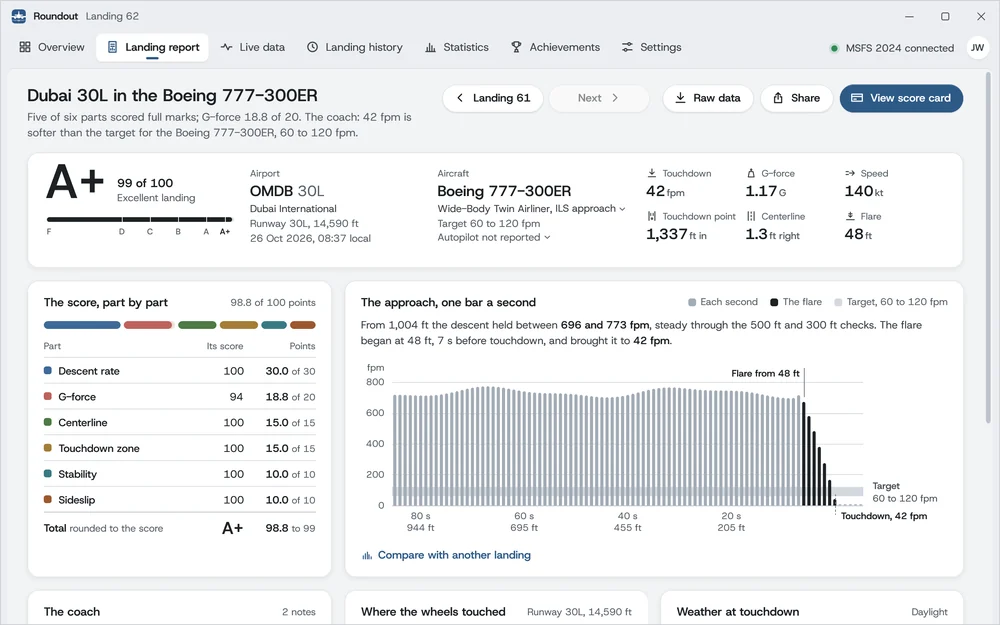
The Landing report
The page for one landing. When the rollout ends the window moves to the landing you just flew, ready when you switch back. View details on a card, or a row in Landing history, opens any other.
The Landing report. Under what shows here come the coach's notes, where the wheels touched, and the weather at touchdown.
Previous and Next
Step to the landing flown before or after this one, on the same page. Each button names the landing it opens, and at either end of your logbook it stays where it is, dimmed.
Raw data
Saves this landing and its approach trace in Documents\Roundout, with Open folder beside the answer.
Share
Opens your landings on your Roundout account. A landing's own page there has Create share link.
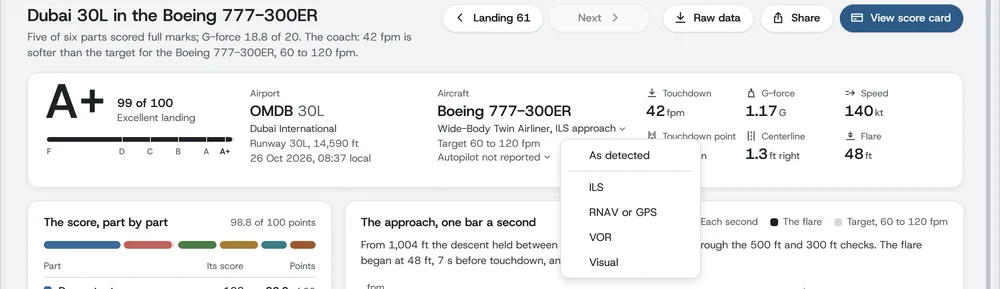
Click either one under the aircraft's name to correct it. Each menu starts with As detected, which puts Roundout's own reading back.
The score, part by part
Each of the six parts, its score, and the points it brought to the total. Hold the pointer over a part for its reading.
The approach, one bar a second
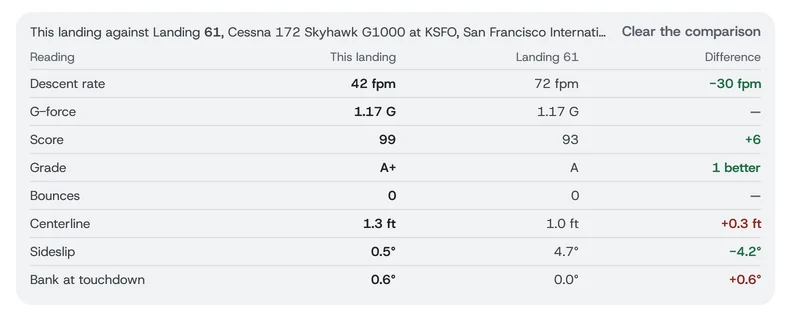
The descent rate through the approach, with the flare and your aircraft's target marked. Compare with another landing lets you pick one, and sets each reading against this landing with the difference beside it. Clear the comparison takes it away.
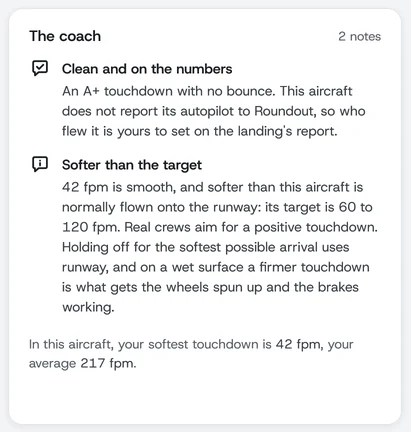
The coach
Up to five notes on what went well and what to work on, with your softest touchdown and your average in this aircraft under them.
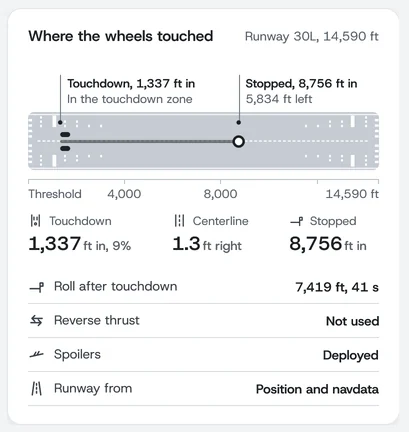
Where the wheels touched
The runway drawn to scale with your touchdown and your stop on it, the rollout's readings, and Runway from.
Weather at touchdown
The sim's weather, and the real-world METAR report for the airport. Look up the weather report (METAR) in SettingsData turns that lookup off.
Click the approach type to correct it. Who flew it has a menu of its own under it.
Comparing two landings reads from the landing you're on.
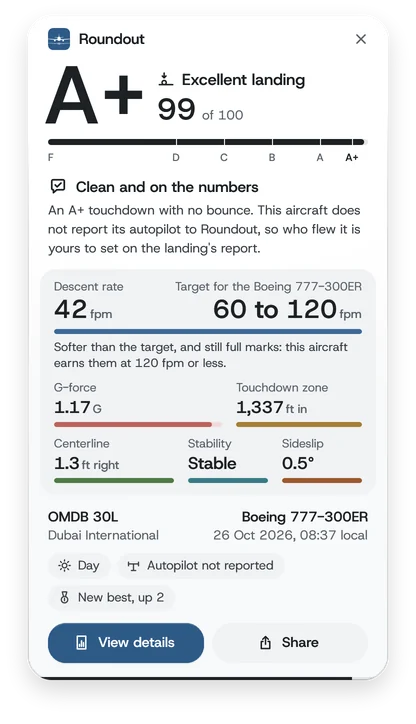
The coach, on a landing of 42 fpm in a Boeing 777-300ER.
Runway detection, in four tiers
Roundout figures out which runway you landed on through a four-tier fallback, so missing MSFS data doesn't silently turn into a free score:
1
The sim's airport data.Roundout asks MSFS for the runway geometry at the airport you're lined up with on final, and again at touchdown, and matches your touchdown to it. Because this is the runway exactly as the sim renders it, centerline and touchdown distances stay accurate even at airports where public map data disagrees with MSFS scenery.
2
The sim's ATC. When the sim's airport data doesn't cover your touchdown, Roundout uses the runway ATC has active, but only if you actually flew along it. ATC names its active runway wherever you are, so a runway you crossed or set down beside isn't used. MSFS measures ATC's touchdown distance from its aiming point rather than the threshold, so Roundout measures that distance on the runway from its bundled airport database instead, or leaves it unscored.
3
Position and navdata. Failing both, Roundout looks up the runway by your touchdown position in the airport database it ships with, built from OurAirports' public-domain data: over 72,000 airports, heliports and seaplane bases, and around 15,500 runways.
4
Not identified. When everything misses (fictional MSFS sceneries, genuine off-airport landings), centerline and touchdown zone are excluded from the weighted total rather than awarded a free 100. The same goes for a touchdown that clearly wasn't on the runway, like a helicopter on a pad beside it or a floatplane on the water. Honest grades over inflated ones.
In the Landing report, Runway from (under Where the wheels touched) names the source: The sim's airport data, The sim's ATC, Position and navdata, or Not identified, so you always know how the runway was identified. Parallel-runway suffixes (15L or 15R) come from MSFS when it shares them and from the navdata otherwise, so a touchdown that MSFS reports as just “15” gets the correct side.
Runway from tells you how Roundout identified the runway.
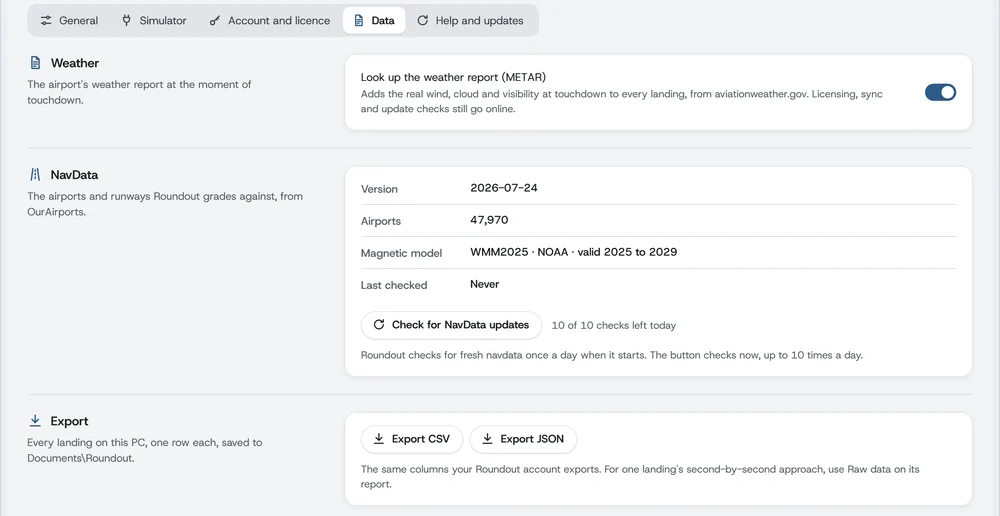
Roundout checks for a fresh airport database once a day, when you launch the app. SettingsDataNavData shows the current version, the count of airports (without the heliports and seaplane bases), the magnetic model in use and when it last checked, and Check for NavData updates looks for a newer one right away. No internet connection is needed in flight; the lookup always runs against the local copy.
Settings, Data: the airport database's version and the two exports.
Non-runway surfaces
When you set down at a heliport or a seaplane base where no runway matches, Roundout records it, and the landing page in your portal shows a chip: Heliport landing or Water landing. Useful when a touchdown off the runways would otherwise look like a normal landing in the logbook.
Local logbook and export
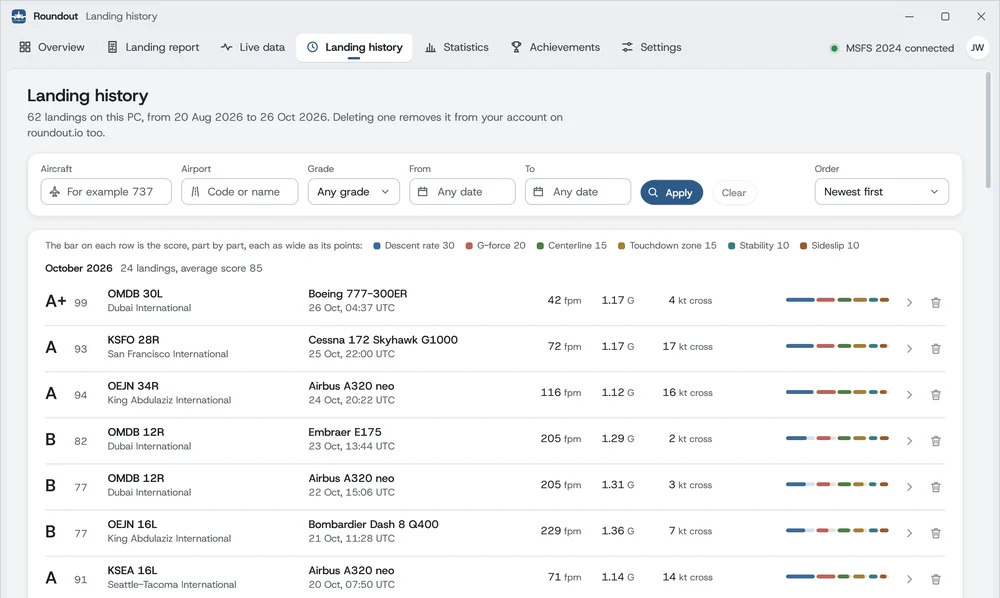
Every landing is saved on your PC, in a file of yours under %LOCALAPPDATA%\Roundout, including the ones you fly offline. Landing history lists them newest first, 50 to a page, and filters by aircraft, airport, grade and dates; click one to open it in the Landing report. Order also sorts them oldest first or by highest score. Export CSV and Export JSON in SettingsData save every landing on the PC in one file in Documents\Roundout (roundout-landings- followed by the date and time), and Raw data in the Landing report saves one landing there with its approach trace (roundout-landing- files).
Landing history: newest first, 50 to a page, filtered by aircraft, airport, grade and dates. Click a landing to open its report.
Roundout never deletes the database by itself, but the uninstaller asks what to remove and has everything ticked by default. To keep your landings on the PC, untick Remove everything (complete uninstall), then untick Landing history. Landings already synced stay in your account either way.
Sync to your account
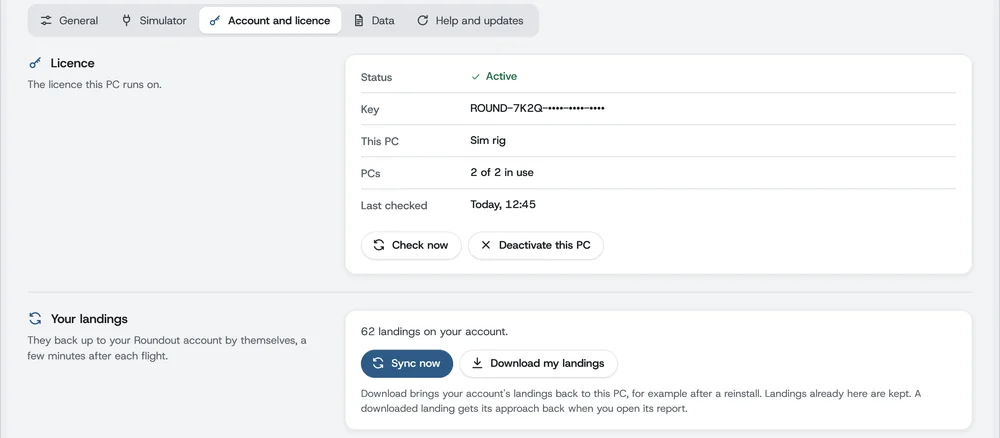
Once Roundout is activated, each landing uploads to your private account by itself shortly after the flight. If it can't (you're offline, say), Roundout retries at startup and every few minutes, less often while it can't get through. After a failed upload the next one sends less at a time and builds back up, so one very long recording can't hold up the landings flown after it. Sync now in SettingsAccount and licence sends them straight away.
Settings, Account and licence: Sync now, Download my landings, and Deactivate this PC.
Sync also runs the other way. Download my landings, in the same place, pulls everything in your account down onto this PC, which is how you fill a second PC or recover after a Windows reinstall. Landings already on the PC are matched and skipped rather than duplicated. A landing downloaded this way comes without its approach trace. When you open it in the Landing report, Roundout gets the trace from your account, so the approach chart, the comparison and Raw data then work on this PC too. If your account can't be reached just then, the report stays without it and Roundout asks again the next time it runs.
If you activate this PC with a licence on a different account, Roundout tells you the landings on it belong to the earlier account. They stay out of your new account either way: Keep them to see them in this app's history and statistics, or Clear landings from this PC to start an empty logbook.
Deletions travel in both directions too. Deleting a landing in the desktop app removes it from your account (so the PC has to be online), and deleting one in the portal removes it from every PC the next time each syncs.
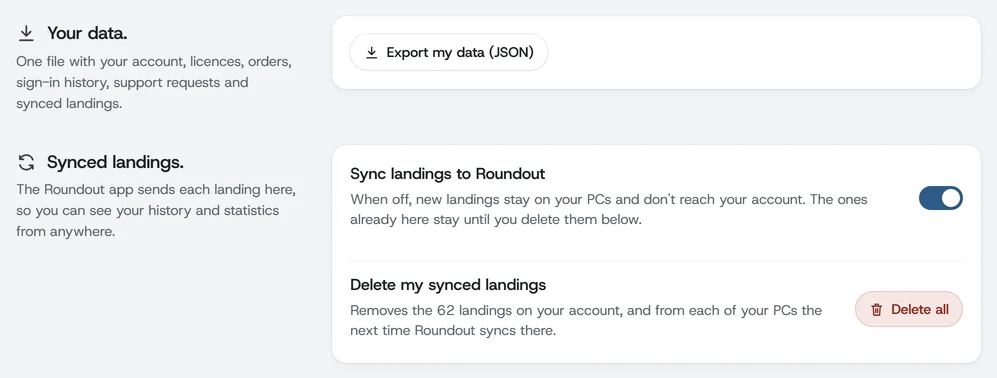
Sync is on by default. To turn it off, open PortalSettingsAccount and switch off Sync landings to Roundout. It takes effect immediately, and your landings keep being saved on your PC. Landings already synced stay in your account until you delete them. With sync off, uploads and downloads are both refused, so “Download my landings” will not work until you turn it back on. Deletions still go through.
Portal, Settings, Account: your data export, the sync switch, and the button that deletes your synced landings.
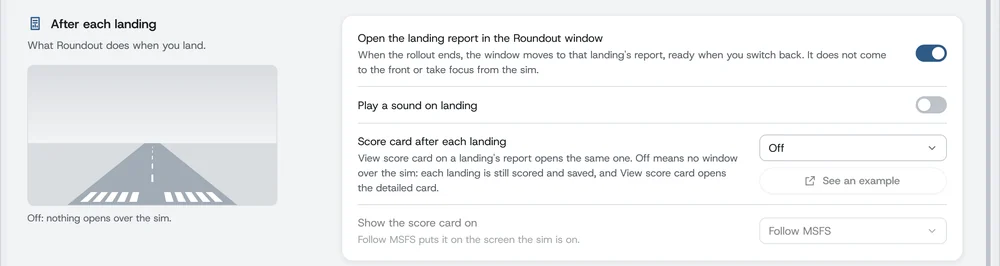
You choose what opens after a landing.
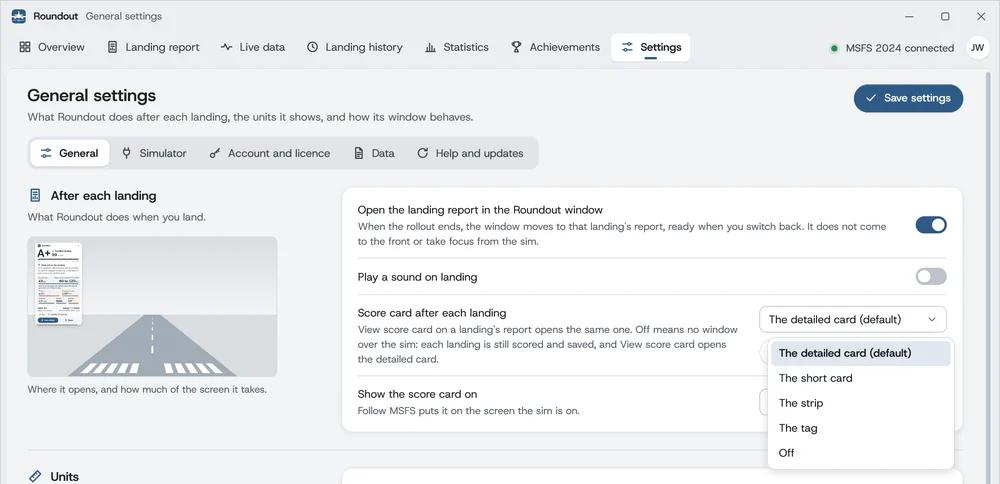
As you roll out after touchdown, a score card opens over the sim with your grade, then closes by itself. There are four cards to choose from, or Off. To choose, open SettingsGeneral, pick one in Score card after each landing, under After each landing, and click Save settings. The detailed card is the default.
Settings, General: the five choices. The small screen shows where the chosen card opens and how much of the screen it takes.
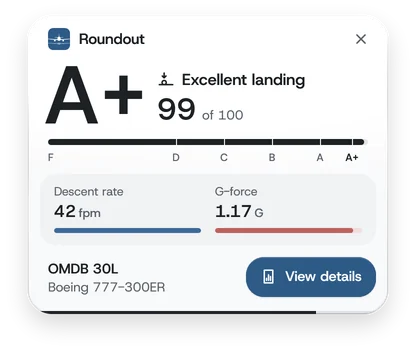
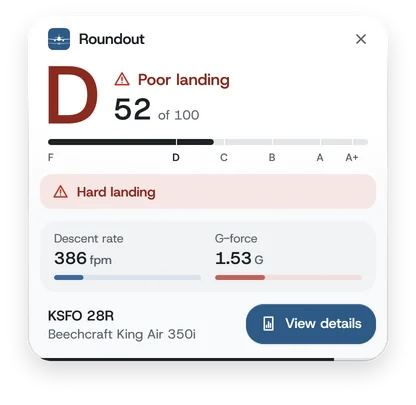
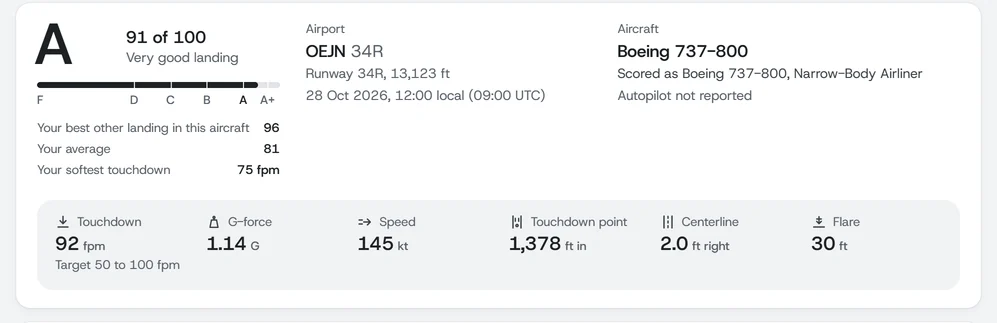
Your grade and score, the coach's top note, the descent rate against your aircraft's target, the other five readings, where and in what, View details and Share
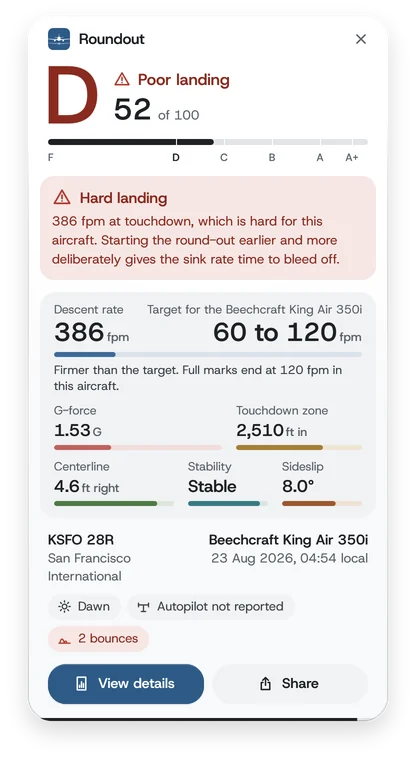
A card whose top note is a warning stays about 5 seconds longer. The bar along its foot counts down, and it waits while the pointer is on the card. The X closes the card at once, and you can drag it anywhere by a part that isn't a button.
A card opens near the top left corner of the screen in Show the score card on: Follow MSFS, the screen the sim is on, or a screen you pick.
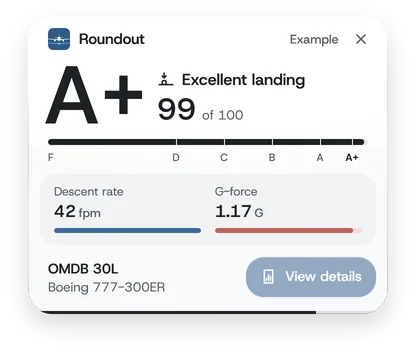
The detailed card
The whole landing at a glance. The coach's top note comes first, then the descent rate against the target for the aircraft you flew, then the other five readings, the airport, the aircraft and the time. Chips say who flew it and what stood out: a bounce, a tail strike, a strong crosswind, a new best. View details opens the landing's report, and Share opens your landings on your Roundout account.
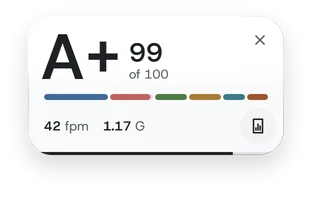
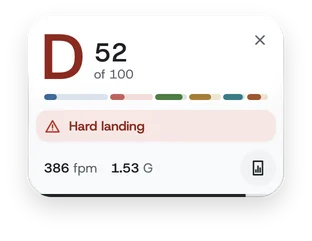
A clean landing, and a firm one. A D or an F reads as a warning from the grade down.
The short card
The top of the detailed card, and the two readings that carry half the score. A warning keeps one line, the headline of the coach's note.
The same two landings on the short card.
The strip
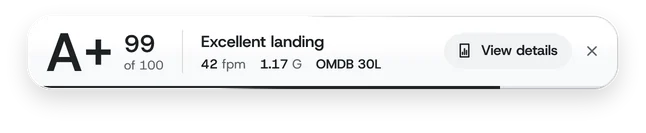
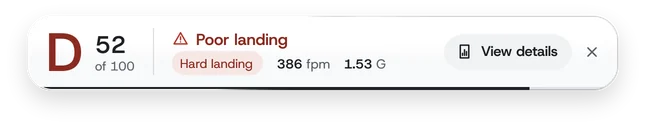
One band that keeps the view clear: your grade, your score, the verdict, the two readings and the runway. A warning takes the runway's place.
The same two landings on the strip.
The tag
The smallest card. The six parts stand as one bar, each as wide as its share of the score: hold the pointer over the bar for each part's points. The round button in the corner opens the report. A warning adds a line.
The same two landings on the tag.
Off
Nothing opens over the sim. Each landing is still scored, saved and synced, and you'll find it in the Landing report and Landing history as usual. Show the score card on is dimmed and keeps your screen for later, and See an example has nothing to show.
With Off, the small screen is empty.
See an example
See an example, under the box, opens the choice in the box over your screen with a sample landing, as a real one would open, whether you've saved it or not. It says Example, its buttons have nothing to open, it makes no sound, and nothing is saved. Choosing another card closes it.
An example says so, and its buttons have nothing to open.
View score card
View score card, on a landing's report, opens that landing's card again: the one you chose, or the detailed card if you chose Off. It has no countdown and stays until you close it, with its X or with the same button, which then reads Hide score card. It plays no sound, and it works with MSFS closed.
Two switches beside it
Also under After each landing: Open the landing report in the Roundout window, on unless you turn it off, moves the window to that landing's report when the rollout ends, ready when you switch back, without coming to the front or taking focus from the sim. Play a sound on landing, off unless you turn it on, plays your Windows notification sound as the landing is scored, with a card or with Off.
How Roundout grades a landing.
Roundout's grading isn't guesswork. Its thresholds start from published standards (the FAA, EASA, the Flight Safety Foundation and manufacturers' manuals) and are checked against real landings, which also set the few limits no standard gives a number for. Centerline, sideslip and bank are scored the same way for every aircraft. Descent rate, G-force and the touchdown zone depend on the aircraft's category: the tables below show the curves Roundout uses for an aircraft it doesn't recognize, and every category's own curves are in aircraft scoring profiles below.
Composite formula
Every landing gets a score from 0 to 100, worked out in three stages:
The six parts, each drawn as wide as its share of the 100 points.
Six part scores feed the weighted sum, and two penalties and one multiplier shape the final number:
Part
Weight
What it captures
Descent rate at touchdown
30%
Vertical speed (fpm) as the wheels meet the ground
G-force at touchdown
20%
Vertical load factor at impact, a cross-check on descent rate
Centerline deviation
15%
Lateral offset from the runway centerline (m)
Touchdown zone accuracy
15%
Distance from the threshold to the touchdown point (m)
Approach stability
10%
Pass or fail at the 500 ft and 300 ft AGL gates
Sideslip and bank at touchdown
10%
Uneven load on the landing gear
Bounce penalty
−10 each
A flat penalty for each bounce after the first touchdown
Tail-strike penalty
−25
Touchdown pitch at or above the aircraft's safe limit
Wind difficulty multiplier
×1.00 to ×1.15
Crosswind component at touchdown
The final score sets the letter grade:
F0D40C55B70A85A+95
A+95 to 100
Airliner-soft, on centerline, in the zone.
A85 to 94
Smooth and well flown, small things to clean up.
B70 to 84
Safe and professional. Probably one part dragged the average.
C55 to 69
Acceptable but visibly rough; a passenger would notice.
D40 to 54
Firm: likely a hard touchdown or a missed centerline.
FUnder 40
A hard landing or way off target. Worth a debrief.
Descent rate at touchdown 30 points
What we measure: the aircraft's vertical speed in feet per minute at the moment the wheels touch the runway, taken from the sim's dedicated touchdown reading (PLANE TOUCHDOWN NORMAL VELOCITY). If Roundout's own recording shows the sim missed the contact (it has reported almost nothing for a crash), Roundout uses the rate from its recording instead.
Why this can differ from your VSI: the sim exposes more than one plausible source for vertical speed and they do not agree. The vertical-speed instrument is damped and lags, so at the instant of contact it can read noticeably softer or harsher than the touchdown actually was. Roundout scores the value captured at contact, which is the one a real flight-data recorder would use. If your VSI showed 150 and Roundout says 210, neither is broken; they are measuring different things.
Why it's the heaviest weight: sink rate at touchdown is the single most reliable sign of a soft landing. Transport aircraft are certified (14 CFR 25.473) for touchdowns of 600 fpm at maximum landing weight and only 360 fpm at maximum takeoff weight. For light aircraft, even a firm Cessna touchdown is rarely more than 200 fpm.
Each category has its own curve, listed in the catalog below. This is the one Roundout uses for an aircraft it doesn't recognize. Scores fall in a straight line between the points.
Vertical speed (fpm)
Score
0 to 100
100
100 to 200
100 to 90
200 to 300
90 to 75
300 to 450
75 to 55
450 to 600
55 to 35
600 to 800
35 to 10
> 800
10
G-force at touchdown 20 points
What we measure: the peak vertical load factor around touchdown (SimConnectG FORCE), as a multiple of normal gravity (1.0 G is level flight). A reading below 1.0 G can't happen at a real touchdown. It means the sim didn't report G for that flight, so Roundout leaves G-force out and grades the parts it did measure.
Why it's separate from descent rate: two landings with the same touchdown fpm can produce very different loads depending on the aircraft's mass, its gear stroke, and how progressively the pilot let the weight settle on the wheels. G-force captures what the airframe actually felt. A smooth airliner landing usually registers 1.1 to 1.3 G; structural inspection thresholds sit around 2.0 to 2.6 G for transport aircraft.
As with descent rate, each category has its own curve, and some aircraft carry their own on top (the Airbus airliners, the CRJs and the Dash 8s among them). This is the one for an aircraft Roundout doesn't recognize:
Touchdown G
Score
≤ 1.21
100
1.21 to 1.42
100 to 85
1.42 to 1.59
85 to 65
1.59 to 1.70
65 to 40
1.70 to 1.98
40 to 10
> 1.98
10
Centerline deviation 15 points
What we measure: the lateral offset (in meters) between the aircraft and the runway centerline at touchdown, computed from the aircraft's position and the runway's geometry. The same curve applies to every aircraft.
Why it matters: the FAA's airman certification standards require a touchdown “with no side drift, and with the airplane's longitudinal axis aligned with and over the runway center/landing path.” A 5 m offset on a typical 30 m wide runway puts you visibly off-center; 10 m starts threatening edge lights on narrower airstrips.
Lateral offset (m)
Score
Read
0 to 2
100
On the line, checkride-clean.
2 to 5
100 to 85
Slightly off, well within tolerance.
5 to 10
85 to 60
Visibly off-center.
10 to 20
60 to 35
Threatens the runway edge on narrower strips.
Over 20
10
Off the runway on most paved strips.
Roundout finds the runway from the sim's own runway data first, then MSFS ATC, then its bundled airport database. If all of them miss (fictional scenery or an off-airport landing), centerline and touchdown zone are left out of the weighted total rather than awarded a free 100. Your grade reflects only what was actually measurable. See runway detection for the full chain.
Touchdown zone accuracy 15 points
What we measure: the distance (in meters) along the runway from its threshold to the touchdown point.
Why it matters: the FAA defines the touchdown zone as the first 3,000 ft (914 m) of the runway, beginning at the threshold. Landing past it steadily shortens the stopping distance left, and runway excursions are one of the most common landing accidents.
The window depends on the category. For an aircraft Roundout doesn't recognize it's scored like this:
Distance from the threshold
Score
Read
200 to 500 m
100
The ideal window.
80 to 200 m
80 to 100
A little short. Fine on a long runway.
0 to 80 m
50 to 80
Very short, chasing the threshold.
500 to 700 m
100 to 50
Past the zone, eating into stopping distance.
700 m to 80% of the runway
50 to 20
A long landing, go-around territory in real operations.
Beyond 80% of the runway
20
Floored at 20.
Each category sets its own ideal window: a narrow-body airliner's is 240 to 600 m, a light single's 50 to 200 m. Each category's values are in the aircraft profiles section.
Approach stability 10 points
What we measure: two pass-or-fail gates, taken once as the aircraft descends through 500 ft AGL and again at 300 ft AGL. At each gate Roundout checks three criteria in parallel:
Speed holding steady: how far the speed at the gate has drifted from the speed you flew over the previous 300 ft of descent. The tolerance is a share of the aircraft's Vref that depends on its category, from 3% for fighters and bombers to 13% for vintage aircraft and 15% for the DC-3 (7% for most airliners, 8% for light singles), never less than 10 kt, or ±15 kt where no Vref is known. This asks whether your speed was settled, not whether it was the right number. Being fast or slow in absolute terms is reported separately as approach speed deviation, against a Vref adjusted for your landing weight, and does not fail this gate.
Bank under control: a bank angle under 5°.
On the correct descent path: this is the authoritative descent-rate check, and what counts as correct depends on whether you are following a published vertical path.
On an ILS glideslope, or an RNAV (GPS) approach flown in its final approach mode, there is a published path to fly, so Roundout checks you were within ±1.5° of the standard 3°.
On any other approach (visual, or a VOR or localizer approach with no glideslope) there's no path to follow, and 3° is a convention rather than your target. Roundout instead checks that the path you flew was steady, within ±2° of the descent path you had established, plus a 1,500 ft/min limit so a uniformly steep dive is still caught.
Either way it is skipped below 50 kt groundspeed, where the angle stops meaning anything.
There used to be a fourth check comparing your descent rate at the gate against the average since 1,000 ft. It was removed in 1.2.31 because it was measuring the wrong thing: on any real approach your descent rate must change as you slow and configure, so converging onto a steady rate scored as unstable. A real PMDG 777 CAT III autoland failed it at both gates by 4 fpm and 2 fpm while passing everything else comfortably, and 42% of all landings ever synced were sitting on the resulting floor. The glideslope check above already tests descent rate, geometrically and correctly.
Both gates need all three criteria true to count as stable:
500 ft
300 ft
Score
Stable
Stable
100
Stable
Destabilized
70
Unstable
Stable
50
Unstable
Unstable
30
When a gate could not be measured at all (you started the flight on short final, or Roundout connected late) it is not treated as a failure. If neither gate was seen, approach stability drops out of the score entirely and the remaining parts are re-weighted. If only one gate was seen, you are scored from the gate we did measure rather than punished for the one we missed: 85 or 40 from the 500 ft gate alone, 75 or 50 from the 300 ft gate alone.
Why this matters more than its weight suggests: Flight Safety Foundation analysis of approach-and-landing accidents found unstabilized approaches a contributing factor in roughly two-thirds of cases. Most carriers' procedures call for a go-around if the aircraft isn't stabilized by 1,000 ft AGL in instrument conditions or 500 ft AGL in visual conditions. Roundout's gates are calibrated against the latter.
Sideslip and bank at touchdown 10 points
What we measure: the absolute sideslip angle (β) and absolute bank angle (φ) at the touchdown. Each is scored on its own, then combined as 0.6 × sideslip + 0.4 × bank.
Why it matters: a sideslip or bank at touchdown puts uneven load on the gear: one main wheel takes more than its share. The FAA's Airplane Flying Handbook teaches the crab and the wing-low sideslip (often combined: a crab on final, a sideslip in the flare), and both end with the longitudinal axis aligned with the runway at touchdown.
Sideslip (β)
Angle
Score
0 to 1°
100
1 to 3°
100 to 80
3 to 5°
80 to 60
5 to 10°
60 to 35
Over 10°
10
Bank (φ)
Angle
Score
0 to 2°
100
2 to 5°
100 to 80
5 to 8°
80 to 55
Over 8°
55 to 20
Bounce penalty −10 for each bounce
What we measure: a bounce is a ground, air, ground transition within 5 seconds of the previous ground contact. Each bounce takes 10 points off the composite score (which then stops at 0).
How we detect them: after the first touchdown, Roundout watches the sim's on-ground flag and each main gear separately, so a wing-low bounce where one wheel stays on the runway still counts. The new contact has to carry a real load (at least 1.3 G) to count; lighter flickers from detailed gear models on a normal rollout are ignored. The window resets on each new contact, so three bounces within seconds of each other all count.
Why a bounce is more than looks: bounces show excess energy at touchdown, usually too much approach speed, an early flare that bled height before settling, or a brief porpoise. The FAA's advice after a light bounce is to hold a normal landing attitude, adding power if needed, and let the aircraft settle; after a hard bounce, to go around at once.
Wind difficulty multiplier
Crosswind landings ask more of the pilot than calm-air landings, so a clean touchdown in a 25 kt crosswind earns a small bonus. The bonus multiplies the raw composite score, and the final score still stops at 100, so a strong crosswind can lift a B to an A but never turns an F into an A.
Crosswind component (kt)
Multiplier
Label
≤ 5
1.00×
Calm / light
5 to 10
1.00×
Moderate
10 to 20
1.05×
Brisk crosswind
20 to 30
1.10×
Strong crosswind
> 30
1.15×
Severe crosswind
Why a multiplier and not added points? Added points behave oddly when the other parts score well: a 99 can't go above 100, so the bonus disappears. A multiplier respects the balance of the score: a sloppy 50 in a strong crosswind still doesn't become an A.
Tail-strike penalty
Every aircraft has a maximum safe pitch attitude at touchdown, beyond which the tail meets the runway. For the Boeing 737-800 it's 9°; for the Airbus A320 it's 10°; for the long Boeing 777-300ER it's just 8°. When Roundout detects a touchdown pitch at or above the limit, the landing takes a 25 point penalty on the composite score, and the landing page shows a "Tail strike risk" warning.
An aircraft uses its own published limit where the catalog has one, and its category's otherwise. Helicopters, eVTOLs and balloons have no tail-strike check. Every limit is listed in the catalog below.
Worked examples
Four landings, one scoring engine, very different stories. Every number follows the formula above.
Buttery 737-800 at EGLL
85 fpm, 1.18 G, no wind
Descent rate: 85 fpm → 100 (the narrow-body curve keeps 100 up to 100 fpm)
G-force: 1.18 G → 93.3 (100 only up to 1.10 G, 90 at 1.22 G)
Centerline, touchdown zone, stability, sideslip: all 100
The same firm touchdown in a Cessna 152 and a 737-800
240 fpm, 1.58 G
Descent rate: 70 in the 152 (between 210 fpm → 75 and 330 fpm → 55), 74.8 in the 737 (between 239 fpm → 75 and 350 fpm → 55)
G-force: 52 in the 152 (between 1.55 G → 55 and 1.75 G → 35), 60.8 in the 737 (between 1.41 G → 75 and 1.65 G → 55)
The per-aircraft system at work: the same readings score differently because the airframes have different limits. Light singles are held to stricter curves at the same numbers, most of all on G.
Even a smooth landing grades poorly when the airframe took an inspection-worthy hit on the tail.
Honest caveats
Roundout's grading is grounded in real standards, but a sim is not a cockpit. A few things to know:
Per-aircraft thresholds are the default. The descent-rate, G-force and touchdown-zone tables in this section are the ones for an aircraft Roundout doesn't recognize. For everything in the catalog (default MSFS and the major payware) Roundout applies the curves for its category. See aircraft scoring profiles.
The sim is the source.Roundout samples MSFS 50 times a second on approach and through the landing, but every reading is only as good as the aircraft's flight model. Centerline and touchdown-zone data depend on accurate runway geometry, and third-party scenery sometimes places a runway slightly differently.
Calibrated against VFR and training standards, not airline procedures. If you're flying an airliner to commercial-cockpit standards on purpose, expect to score in the A range routinely.
The grading rewards consistency. A single A+ landing is great. Ten landings in a row averaging A is the real sign of skill, and that's what your portal statistics track.
Honest scoring beats inflated scoring. When runway data is missing (rare: fictional scenery or genuine off-airport landings), Roundout leaves centerline and touchdown zone out of the composite rather than handing out a free 100 on each.
"Not measured" is never treated as zero. Any part Roundout could not measure is dropped from the weighted total and the remaining weights are rescaled, so your score reflects only what was actually observed. A part that was measured can never score 0, because every curve has a floor of at least 10.
Some landings get no letter grade at all. If the runway could not be identified and the approach was never seen, the only things left are how hard you touched down and whether you were crabbed. That says nothing about where you landed or how you got there, so those landings show "No grade" in place of a letter and do not count toward your average score, grade streaks or score-based achievements. Every part Roundout did measure is still shown. Before this, one such landing scored a flat 100 and was graded A+ on two parts.
Impossible captures count toward nothing. A slew, a reposition, a crash, or the scenery reloading under the aircraft can produce a "landing" that never happened: readings no aircraft could survive, readings too gentle to be a landing at all, an aircraft inverted at touchdown, or one that was not moving in any direction. Roundout checks the whole touchdown for this, and when it does not believe the capture the landing gets no grade, no coaching and no place in your statistics or achievements. It stays in your logbook with an explanation, because it is your data.
Per-aircraft thresholds for 498 airframes.
A 200 fpm touchdown is well below a Boeing 737's certification limit but at the upper end of acceptable in a Cessna 152. Roundout's per-aircraft profiles apply the right curves for the airframe you're flying, across 28 categories covering 498 named aircraft, default and add-on.
Profiles ship with the desktop app as profiles.json. The same source spreadsheet generates both the desktop's profiles and this catalog, so the numbers below match what the latest version of Roundout applies in flight. Each aircraft also has its own page in the aircraft guide.
How Roundout matches your aircraft
When MSFS reports the aircraft title (for example "PMDG Boeing 737-800 BCF"), Roundout walks the tiers below in order, and the first hit wins. Every landing page shows the profile and category it was scored against.
1
Named profileTier 1 The most specific match among the 498 named profiles. "737-800" in the title hits the Boeing 737-800 entry directly. It wins when the title carries a unique, variant-bearing pattern, including add-on naming styles like "FenixA319" or "ProSimA320".
2
Sub-familyTier 2 If no exact variant matches, the title is routed to one of 66 sub-families (for example “Airbus A320 family” or “Boeing 737”) and scored with that sub-family's own real-world values. A bare "A320" in a title lands here instead of on generic defaults.
3
Category fallbackTier 3 Titles that only reveal a broad type are routed to a category by a broad pattern: narrow-body, wide-body, GA, fighter, warbird, helicopter and so on.
4
Ask the simTier 4 Added in 1.2.35. Some liveries carry no aircraft type in the title at all, such as "FBW Turkish Airlines TC-JPV" or "China Southern B-6138", and can never be identified from the title however many patterns we add. When every tier above has come up empty, Roundout asks MSFS what you are flying and matches on the type code it reports. Because this runs last, an aircraft that is recognized today is recognized exactly as before.
5
UncategorizedTier 5 Unknown mods or experimental titles fall through to the Uncategorized profile, a middle-ground set of curves. The landing is marked so you know (“Scored with the default curves” in your portal, “Default scoring” in the app).
Every landing page shows the profile and category it was scored as.
If your add-on isn't recognized or lands on a profile you think is wrong, email support@roundout.io with the exact aircraft title: hold the pointer over the aircraft's name in the Landing report to see it. We add aircraft to the library in regular updates.
Per-aircraft scoring examples
The same reading, a different aircraft, a very different score. This is the whole point of per-aircraft profiles.
Touchdown
Boeing 737-800, narrow-body
Cessna 152, light single
85 fpm
100 inside the full-score plateau (up to 100 fpm)
96 between 60 fpm (100) and 120 fpm (90)
200 fpm
82 a solid airliner touchdown
77 getting firm for a trainer
240 fpm
75 at the firm boundary (239 fpm)
70 a passenger would feel it
400 fpm
46 hard-landing territory
43 gear-stress territory for a 152
600 fpm
10 at the certification hard-landing limit
10 it would damage a 152
The touchdown-zone window and the approach-speed tolerance change by category too, and the tail-strike limit by aircraft where one is published. The catalog below has each category's exact thresholds.
Wind multiplier and tail-strike penalty
Two modifiers apply on top of the per-aircraft part scores: a crosswind multiplier (×1.00 to ×1.15 by tier) and a tail-strike penalty when touchdown pitch reaches the aircraft's safe limit (−25 points). Both are described in the grading section above; each aircraft's pitch limit is listed in its category below.
The catalog, 28 categories
Every aircraft Roundout recognizes belongs to one of these categories, and anything it doesn't recognize uses the Uncategorized curves. Open one for its full thresholds, its aircraft and the sources.
Scores fall in a straight line between these points, and hold the first and last points' scores beyond them.
Touchdown-zone ideal
50 to 200m
Long-landing edge
250m
Tail-strike pitch
12.0°by default
Vref tolerance
±8%at least 10 kt
Glideslope limit
±1.5°the floor
This table lists ±1.5°, but every category is held at a ±1.5° floor. Tighter values sat below the measurement's own noise and failed correctly flown approaches, autolands among them.
Typical Vref
54 to 77kt
Aircraft in this category (52)
Vref is the threshold speed at the reference weight shown, usually the maximum landing weight. Roundout adjusts it to the weight you actually land at.
14 CFR 23.473; Cessna 172 SM Ch.5-50-00; Cessna 152 Service Manual
FAR 23.473 mid-band (≈8-9 ft/s ≈ 480-540 fpm at MLW). Higher Vref → more energy at impact.
Descent-rate score curve
At (fpm)
Score
80
100
138
90
224
75
340
55
456
35
600
10
G-force score curve
At (G)
Score
1.1
100
1.2
90
1.35
75
1.55
55
1.75
35
2.0
10
Scores fall in a straight line between these points, and hold the first and last points' scores beyond them.
Touchdown-zone ideal
50 to 250m
Long-landing edge
300m
Tail-strike pitch
11.0°by default
Vref tolerance
±6%at least 10 kt
Glideslope limit
±1.5°the floor
This table lists ±1.5°, but every category is held at a ±1.5° floor. Tighter values sat below the measurement's own noise and failed correctly flown approaches, autolands among them.
Typical Vref
65 to 90kt
Aircraft in this category (30)
Vref is the threshold speed at the reference weight shown, usually the maximum landing weight. Roundout adjusts it to the weight you actually land at.
FAR 23.473 upper band (≈9-10 ft/s ≈ 540-600 fpm at MLW). Twin gear handles slightly more.
Descent-rate score curve
At (fpm)
Score
80
100
138
90
224
75
340
55
456
35
600
10
G-force score curve
At (G)
Score
1.1
100
1.2
90
1.35
75
1.55
55
1.75
35
2.0
10
Scores fall in a straight line between these points, and hold the first and last points' scores beyond them.
Touchdown-zone ideal
60 to 280m
Long-landing edge
350m
Tail-strike pitch
11.0°by default
Vref tolerance
±6%at least 10 kt
Glideslope limit
±1.5°the floor
This table lists ±1.5°, but every category is held at a ±1.5° floor. Tighter values sat below the measurement's own noise and failed correctly flown approaches, autolands among them.
Typical Vref
78 to 93kt
Aircraft in this category (28)
Vref is the threshold speed at the reference weight shown, usually the maximum landing weight. Roundout adjusts it to the weight you actually land at.
Wheel landings aim for almost no sink, three-point landings for about 50 to 100 fpm. A bounce in a tailwheel aircraft can turn into a ground loop, so the descent-rate curve is stricter than for tricycle-gear singles.
Descent-rate score curve
At (fpm)
Score
50
100
100
90
175
75
275
55
375
35
500
10
G-force score curve
At (G)
Score
1.1
100
1.18
90
1.29
75
1.45
55
1.61
35
1.8
10
Scores fall in a straight line between these points, and hold the first and last points' scores beyond them.
Touchdown-zone ideal
30 to 150m
Long-landing edge
200m
Tail-strike pitch
12.0°by default
Vref tolerance
±9%at least 10 kt
Glideslope limit
±1.5°the floor
This table lists ±1.5°, but every category is held at a ±1.5° floor. Tighter values sat below the measurement's own noise and failed correctly flown approaches, autolands among them.
Typical Vref
43 to 65kt
Aircraft in this category (39)
Vref is the threshold speed at the reference weight shown, usually the maximum landing weight. Roundout adjusts it to the weight you actually land at.
Manufacturer
Model
Variant
MTOW (kg)
Vref (kt)
Ref. weight (kg)
Tail strike
MSFS source
American Champion
Scout
8GCBC Scout (180 hp; 210 hp Denali option)
975
56
975
12.0°
Payware (Hangar 713)
Aviat
Husky A-1C
A-1C-200
1021
60
1021
12.0°
Payware (Asobo)
Aviat
Pitts Special
S1S
522
64
522
12.0°
Default Std
Aviat
Pitts Special
S2S
714
70
714
12.0°
Default Std
Boeing
Stearman
PT-17
1338
62
1338
13.0°
Payware (DC Designs)
Bucker
Bü-131
Jungmann
670
58
670
12.0°
Payware (Lionheart)
CAP
CAP-4
Paulistinha
587
47
587
12.0°
Free Marketplace (iniBuilds)
Cessna
140
140 (1946-49, V-strut, C-85)
658
51
658
12.0°
Payware (Aeroplane Heaven)
Cessna
170B
170B (Continental C145-2)
998
59
998
12.0°
Payware (Carenado)
Cessna
185F
Skywagon
1520
64
1520
12.0°
Free Marketplace (Carenado)
Cessna
188
AGTruck
1497
66
1497
12.0°
Default Deluxe
Cessna
195
Businessliner
1520
70
1520
12.0°
Default Aviator
Cessna
L-19
Bird Dog
1089
55
1089
12.0°
Payware (BlackBox)
CubCrafters
XCub
XCub CC19-180 (180 hp)
1043
52
1043
12.0°
Default Std
De Havilland Canada
DHC-1
Chipmunk
953
55
953
12.0°
Payware (Aeroplane Heaven)
Decathlon
Super (713)
8KCAB-180 Super Decathlon (AEIO-360-H1B)
885
64
885
12.0°
Payware (Hangar 713)
EXTRA
330LT
EA 300/LT (Extra 330LT)
950
85
950
12.0°
Default Std
Globe
Swift
GC-1A (85 hp Continental C-85)
712
52
712
12.0°
Payware (Aeroplane Heaven)
MX Aircraft
MXS-R
MXS-R (race version of the MXS)
835
75
835
12.0°
Default Std
Maule
M7-235
M-7-235C Orion (IO-540-W, 235 hp)
1134
56
1134
12.0°
Payware (Pilot Experience Sim)
Maule
MX-7-180
MX-7-180 Star Rocket (O-360, constant speed)
1134
60
1134
12.0°
Payware (Heaven Designs)
PZL
PZL-104
Wilga
1300
59
1265
12.0°
Payware (Got Friends)
Pietenpol
Air Camper
Air Camper (Continental A65)
490
52
490
12.0°
Payware (Emerald Scenery Design)
Piper
J-3
Cub
553
43
553
12.0°
Payware (Classic Aircraft)
Piper
L-4
Grasshopper
553
43
553
12.0°
Payware (Flight Replicas)
Piper
PA-11
Cub Special
553
46
553
12.0°
Payware (Flight Replicas)
Piper
Pacer
PA-20 Pacer (180 hp conversion); Tri-Pacer in package
FAR 23 commuter category. PC-12 AMM Doc 02049; TBM AMM Ch.5; cert min ≈8-9 ft/s.
Descent-rate score curve
At (fpm)
Score
100
100
156
90
239
75
350
55
461
35
600
10
G-force score curve
At (G)
Score
1.1
100
1.27
90
1.52
75
1.85
55
2.18
35
2.6
10
Scores fall in a straight line between these points, and hold the first and last points' scores beyond them.
Touchdown-zone ideal
80 to 300m
Long-landing edge
400m
Tail-strike pitch
12.0°by default
Vref tolerance
±12%at least 10 kt
Glideslope limit
±1.5°the floor
This table lists ±1.5°, but every category is held at a ±1.5° floor. Tighter values sat below the measurement's own noise and failed correctly flown approaches, autolands among them.
Typical Vref
75 to 90kt
Aircraft in this category (16)
Vref is the threshold speed at the reference weight shown, usually the maximum landing weight. Roundout adjusts it to the weight you actually land at.
Manufacturer
Model
Variant
MTOW (kg)
Vref (kt)
Ref. weight (kg)
Tail strike
MSFS source
Air Tractor
AT-802
AT-802A (sprayer / fire bomber)
7257
103
7257
12.0°
Default Std
Beechcraft
Bonanza
B36TP (PT6A-21 conversion)
1837
75
1837
13.0°
Payware (Black Square)
Cessna
208B
Grand Caravan EX
3995
80
3856
12.0°
Default Std
Daher
TBM
850
3354
85
3186
12.0°
Payware (Black Square)
Daher
TBM
930
3354
85
3186
12.0°
Default Std
Draco
X
Draco X (only version, PT6-140)
1814
48
1814
12.0°
Default Std
Embraer
EMB-312
Tucano
3175
90
2550
12.0°
Payware (RPSimulations)
Epic Aircraft
E1000
GX
3629
86
3447
12.0°
Not available for MSFS (announced by Lionheart Creations)
Pilatus PC-12 AMM; Daher TBM AMM Ch.5; 14 CFR 23.473
FAR 25 transport (King Air 350, ATR, Q400). 600 fpm at MLW per 25.473. ATR Smart Lander adds severity tiers.
Descent-rate score curve
At (fpm)
Score
120
100
173
90
253
75
360
55
467
35
600
10
G-force score curve
At (G)
Score
1.1
100
1.27
90
1.52
75
1.85
55
2.18
35
2.6
10
Scores fall in a straight line between these points, and hold the first and last points' scores beyond them.
Touchdown-zone ideal
120 to 380m
Long-landing edge
500m
Tail-strike pitch
9.0°by default
Vref tolerance
±9%at least 10 kt
Glideslope limit
±1.5°the floor
This table lists ±1.0°, but every category is held at a ±1.5° floor. Tighter values sat below the measurement's own noise and failed correctly flown approaches, autolands among them.
Typical Vref
95 to 122kt
Aircraft in this category (32)
Vref is the threshold speed at the reference weight shown, usually the maximum landing weight. Roundout adjusts it to the weight you actually land at.
Manufacturer
Model
Variant
MTOW (kg)
Vref (kt)
Ref. weight (kg)
Tail strike
MSFS source
ATR
42
-600
18600
104
18300
9.0°
Default Aviator
ATR
72
-600
23000
110
22350
9.0°
Default Aviator
Amphibian Aerospace
Albatross
G111/HU-16
13882
89
13381
9.0°
Default Deluxe
Beechcraft
King Air
350 (B300), Black Square analog
6804
109
6804
12.0°
Payware (Black Square)
Beechcraft
King Air
350i
6804
109
6804
12.0°
Default Std
Beechcraft
King Air
B200
5670
107
5670
12.0°
Payware (Carenado)
Beechcraft
King Air
C90 GTX
4756
100
4460
12.0°
Default Premium, Payware (Carenado)
Beechcraft
Model 99
B99
4944
96
4944
9.0°
Payware (Virtualcol)
Beechcraft
Starship
Starship 2000A (Model 2000, NC-29 on)
6759
118
6205
9.0°
Payware (Black Square)
Bombardier
Dash 8
-100
16466
92
15377
7.0°
Payware (Virtualcol)
Bombardier
Dash 8
-200 (DHC-8-201)
16466
94
15650
7.0°
Payware (Virtualcol)
Bombardier
Dash 8
Q400
29574
119
28123
7.0°
Freeware (RTomas)
Britten-Norman
BN-2T
Turbine Islander
3175
62
3084
9.0°
Payware (BlackBox)
Cessna
408
SkyCourier
8618
95
8437
9.0°
Default Deluxe
Cessna
F406
Caravan II
4468
103
4246
9.0°
Payware (iniBuilds)
De Havilland Canada
CL-415
CL-415 (CL-215-6B11), firefighting
19890
88
16783
9.0°
Default Std
De Havilland Canada
DHC-6
Twin Otter
5670
74
5579
9.0°
Default Std
Dornier
228
Do 228 (sub-series not stated; 19-seat)
5980
85
5700
9.0°
Payware (Carenado)
Embraer
EMB-110P
Bandeirante
5900
92
5700
9.0°
Payware (NextGen)
Embraer
EMB-121
Xingu
5670
92
5340
9.0°
Payware (BRSimDesigns)
Eviation
Alice
Alice
8346
95
8346
9.0°
Payware (LivToAir)
Fokker
F27
Friendship
18370
91
15422
9.0°
Payware (iniBuilds)
Grumman
C-2A
Greyhound
26082
105
23733
9.0°
Not available for MSFS
Grumman
G-159
Gulfstream I
16329
113
15551
9.0°
Freeware (Gallosko)
Heart Aerospace
ES-30
ES-30
21000
95
21000
9.0°
Default Std
Mitsubishi
MU-2
MU-2B-25/-26 (short body, TPE331-6-251M)
4749
100
4516
9.0°
Default Aviator
NAMC
YS-11
YS-11A (Dart Mk.542; Passenger and VIP Charter)
24499
98
24000
9.0°
Payware (iniBuilds)
North American
OV-10
Bronco
6532
100
5897
9.0°
Payware (AzurPoly)
Saab
2000
Saab 2000
22999
121
22000
9.0°
Not available for MSFS (announced by NextGen Simulations)
Saab
340B
340B (incl. cargo versions)
13155
114
12930
9.0°
Default Premium
Short
SC.7
Skyvan
5670
91
5670
9.0°
Default Aviator
Shorts
SD3-30/SD3-60
SD3-30 and SD3-60 (incl. Sherpa, C-23)
12292
104
12020
9.0°
Payware (BlackBox)
Representative airframes
Beech King Air 90/200/350, ATR 42/72-600, Bombardier Q400, Saab 340, Jetstream, F27
Source
Beech King Air 350 AMM Ch.5-50-00; ATR Flight Safety Magazine 'Hard Landing AMM Improvements'; 14 CFR 25.473
FAR 25 transport, 600 fpm at maximum landing weight per 25.473. The four-engine Dash 7 shares the twin turboprops' curves and touchdown zone.
Descent-rate score curve
At (fpm)
Score
120
100
173
90
253
75
360
55
467
35
600
10
G-force score curve
At (G)
Score
1.1
100
1.27
90
1.52
75
1.85
55
2.18
35
2.6
10
Scores fall in a straight line between these points, and hold the first and last points' scores beyond them.
Touchdown-zone ideal
120 to 380m
Long-landing edge
500m
Tail-strike pitch
9.0°by default
Vref tolerance
±12%at least 10 kt
Glideslope limit
±1.5°the floor
This table lists ±1.0°, but every category is held at a ±1.5° floor. Tighter values sat below the measurement's own noise and failed correctly flown approaches, autolands among them.
Typical Vref
70 to 95kt
Aircraft in this category (1)
Vref is the threshold speed at the reference weight shown, usually the maximum landing weight. Roundout adjusts it to the weight you actually land at.
Manufacturer
Model
Variant
MTOW (kg)
Vref (kt)
Ref. weight (kg)
Tail strike
MSFS source
Bombardier
Dash 7
DHC-7 Series 100 (-102/-103)
19958
83
19051
9.0°
Payware (PILOT'S)
Representative airframes
de Havilland Canada Dash 7 (DHC-7)
Source
As for the twin turboprops: Beech King Air 350 AMM Ch.5-50-00; ATR Flight Safety Magazine 'Hard Landing AMM Improvements'; 14 CFR 25.473
FAR 23 commuter or FAR 25. Lighter than mid-bizjets but jet-grade systems.
Descent-rate score curve
At (fpm)
Score
100
100
156
90
239
75
350
55
461
35
600
10
G-force score curve
At (G)
Score
1.1
100
1.27
90
1.52
75
1.85
55
2.18
35
2.6
10
Scores fall in a straight line between these points, and hold the first and last points' scores beyond them.
Touchdown-zone ideal
120 to 380m
Long-landing edge
500m
Tail-strike pitch
11.0°by default
Vref tolerance
±10%at least 10 kt
Glideslope limit
±1.5°the floor
This table lists ±1.0°, but every category is held at a ±1.5° floor. Tighter values sat below the measurement's own noise and failed correctly flown approaches, autolands among them.
Typical Vref
83 to 112kt
Aircraft in this category (7)
Vref is the threshold speed at the reference weight shown, usually the maximum landing weight. Roundout adjusts it to the weight you actually land at.
Scores fall in a straight line between these points, and hold the first and last points' scores beyond them.
Touchdown-zone ideal
150 to 460m
Long-landing edge
600m
Tail-strike pitch
11.0°by default
Vref tolerance
±9%at least 10 kt
Glideslope limit
±1.5°the floor
This table lists ±1.0°, but every category is held at a ±1.5° floor. Tighter values sat below the measurement's own noise and failed correctly flown approaches, autolands among them.
Typical Vref
100 to 130kt
Aircraft in this category (15)
Vref is the threshold speed at the reference weight shown, usually the maximum landing weight. Roundout adjusts it to the weight you actually land at.
FAR 25. 600 fpm at MLW. Heavier mass, more momentum but robust gear.
Descent-rate score curve
At (fpm)
Score
100
100
156
90
239
75
350
55
461
35
600
10
G-force score curve
At (G)
Score
1.1
100
1.2
90
1.35
75
1.55
55
1.75
35
2.0
10
Scores fall in a straight line between these points, and hold the first and last points' scores beyond them.
Touchdown-zone ideal
180 to 520m
Long-landing edge
700m
Tail-strike pitch
11.0°by default
Vref tolerance
±9%at least 10 kt
Glideslope limit
±1.5°the floor
This table lists ±1.0°, but every category is held at a ±1.5° floor. Tighter values sat below the measurement's own noise and failed correctly flown approaches, autolands among them.
Typical Vref
106 to 127kt
Aircraft in this category (3)
Vref is the threshold speed at the reference weight shown, usually the maximum landing weight. Roundout adjusts it to the weight you actually land at.
Manufacturer
Model
Variant
MTOW (kg)
Vref (kt)
Ref. weight (kg)
Tail strike
MSFS source
Bombardier
Global
5000/6000
45132
128
35652
11.0°
Freeware (Giba720)
Bombardier
Global
7500
52095
126
39735
11.0°
Not available for MSFS (announced by CJ Simulations)
Gulfstream
G650/G700
G650 / G700
45177
137
37874
11.0°
Freeware (dillan4561)
Representative airframes
Gulfstream G650/G700, Falcon 7X/8X/2000/900, Bombardier Global 5000/6000/7500, Citation Longitude, G550
FAR 25. 600 fpm at MLW. Lower MTOW than narrow-bodies but same cert standard.
Descent-rate score curve
At (fpm)
Score
110
100
164
90
246
75
355
55
464
35
600
10
G-force score curve
At (G)
Score
1.1
100
1.27
90
1.52
75
1.85
55
2.18
35
2.6
10
Scores fall in a straight line between these points, and hold the first and last points' scores beyond them.
Touchdown-zone ideal
200 to 550m
Long-landing edge
750m
Tail-strike pitch
10.0°by default
Vref tolerance
±8%at least 10 kt
Glideslope limit
±1.5°the floor
This table lists ±0.7°, but every category is held at a ±1.5° floor. Tighter values sat below the measurement's own noise and failed correctly flown approaches, autolands among them.
Typical Vref
120 to 145kt
Aircraft in this category (17)
Vref is the threshold speed at the reference weight shown, usually the maximum landing weight. Roundout adjusts it to the weight you actually land at.
FAR 25.473: 600 fpm MLW / 360 fpm overweight. Boeing AMM Ch.5-51 Phase-1 inspection at +1.7g main gear / Phase-2 at +2.1-2.2g. Airbus LR15: 1.80g amber / 2.06g red.
Descent-rate score curve
At (fpm)
Score
100
100
156
90
239
75
350
55
461
35
600
10
G-force score curve
At (G)
Score
1.1
100
1.22
90
1.41
75
1.65
55
1.89
35
2.2
10
Scores fall in a straight line between these points, and hold the first and last points' scores beyond them.
Touchdown-zone ideal
240 to 600m
Long-landing edge
800m
Tail-strike pitch
10.0°by default
Vref tolerance
±7%at least 10 kt
Glideslope limit
±1.5°the floor
This table lists ±0.7°, but every category is held at a ±1.5° floor. Tighter values sat below the measurement's own noise and failed correctly flown approaches, autolands among them.
Typical Vref
120 to 150kt
Aircraft in this category (33)
Vref is the threshold speed at the reference weight shown, usually the maximum landing weight. Roundout adjusts it to the weight you actually land at.
Boeing 737 NG/MAX (all variants), Airbus A220 (CS100/300), A318/A319/A320/A321 (ceo+neo+XLR), 757-200/300, MD-80/90, DC-9, Boeing 717, 727
Source
Boeing 737 AMM Ch.5-51-08; Airbus A320 AMM 05-51-11-200-004; Boeing FCTM Ch.6; 14 CFR 25.473
FAR 25.473. Boeing 777 AMM Ch.5-51-11: +1.7g Phase-1 / +2.2g zero-roll Phase-2 / >6° roll always Phase-2. FCTM target -150 to -300 fpm; up to -360 fpm operationally acceptable.
Descent-rate score curve
At (fpm)
Score
120
100
173
90
253
75
360
55
467
35
600
10
G-force score curve
At (G)
Score
1.1
100
1.22
90
1.41
75
1.65
55
1.89
35
2.2
10
Scores fall in a straight line between these points, and hold the first and last points' scores beyond them.
Touchdown-zone ideal
300 to 700m
Long-landing edge
900m
Tail-strike pitch
9.0°by default
Vref tolerance
±7%at least 10 kt
Glideslope limit
±1.5°the floor
This table lists ±0.7°, but every category is held at a ±1.5° floor. Tighter values sat below the measurement's own noise and failed correctly flown approaches, autolands among them.
Typical Vref
130 to 160kt
Aircraft in this category (21)
Vref is the threshold speed at the reference weight shown, usually the maximum landing weight. Roundout adjusts it to the weight you actually land at.
Manufacturer
Model
Variant
MTOW (kg)
Vref (kt)
Ref. weight (kg)
Tail strike
MSFS source
Airbus
A300
-600R
171700
135
140000
9.0°
Payware (iniBuilds)
Airbus
A310
-300
150000
136
123000
9.0°
Default Std
Airbus
A330
-200
242000
136
182000
10.0°
Default Std
Airbus
A330
-200 (PW)
233000
136
182000
10.0°
Payware (LatinVFR)
Airbus
A330
-300
242000
137
187000
10.0°
Default Std
Airbus
A330
-300 (PW)
242000
137
187000
10.0°
Payware (LatinVFR/Project Mega)
Airbus
A330
-300P2F
233000
138
187000
10.0°
Default Std
Airbus
A330
-800neo
251000
140
186000
10.0°
Payware (LatinVFR), Freeware (AstorAST)
Airbus
A330
-900neo
251000
142
191000
10.0°
Payware (Aerosoft)
Airbus
A330-743L
Beluga XL
227000
137
187000
10.0°
Default Std
Airbus
A350
-1000
319000
147
236000
10.0°
Payware (iniBuilds)
Airbus
A350
-900
280000
140
205000
10.0°
Payware (iniBuilds)
Boeing
767
-300ER
186880
145
145149
8.0°
Payware (Captain Sim/RHD)
Boeing
767
-400ER
204116
150
158757
8.0°
Payware (Captain Sim)
Boeing
777
-200ER
297557
140
213188
8.0°
Payware (PMDG)
Boeing
777
-200LR
347451
138
223167
8.0°
Payware (PMDG)
Boeing
777
-300ER
351535
149
251277
8.0°
Payware (PMDG/Captain Sim)
Boeing
777F
Freighter
347815
149
260554
8.0°
Payware (PMDG)
Boeing
787
-10 Dreamliner
254000
157
201828
8.5°
Default Premium
Boeing
787
-8
227930
142
172365
8.5°
Payware (Bravo/iniBuilds)
Boeing
787
-9
254692
153
192776
8.5°
Payware (Bravo/iniBuilds)
Representative airframes
Boeing 767, 777, 787 (all variants); Airbus A300, A310, A330ceo/neo, A350-900/-1000
Source
Boeing 777 AMM Ch.5-51-11; Airbus A330 AMM 05-51-11-200-802-A; 14 CFR 25.473
FAR 25.473 transport certification. Three-engine wide-bodies share the wide-body twins' curves and touchdown zone.
Descent-rate score curve
At (fpm)
Score
120
100
173
90
253
75
360
55
467
35
600
10
G-force score curve
At (G)
Score
1.1
100
1.22
90
1.41
75
1.65
55
1.89
35
2.2
10
Scores fall in a straight line between these points, and hold the first and last points' scores beyond them.
Touchdown-zone ideal
300 to 700m
Long-landing edge
900m
Tail-strike pitch
9.0°by default
Vref tolerance
±7%at least 10 kt
Glideslope limit
±1.5°the floor
This table lists ±0.7°, but every category is held at a ±1.5° floor. Tighter values sat below the measurement's own noise and failed correctly flown approaches, autolands among them.
Typical Vref
140 to 165kt
Aircraft in this category (2)
Vref is the threshold speed at the reference weight shown, usually the maximum landing weight. Roundout adjusts it to the weight you actually land at.
Manufacturer
Model
Variant
MTOW (kg)
Vref (kt)
Ref. weight (kg)
Tail strike
MSFS source
Lockheed
L-1011
TriStar
231332
144
166922
9.0°
Payware (iniBuilds)
McDonnell Douglas
MD-11
MD-11 and MD-11F (GE CF6 and PW4000)
286000
152
207750
10.0°
Payware (Sky/TFDi)
Representative airframes
McDonnell Douglas MD-11 and DC-10, Lockheed L-1011 TriStar
Source
As for the wide-body twins: Boeing 777 AMM Ch.5-51-11; Airbus A330 AMM 05-51-11-200-802-A; 14 CFR 25.473
FAR 25.473. Heaviest aircraft in the table. Gear designed for higher energy absorption. -300 fpm comfortably acceptable at MLW.
Descent-rate score curve
At (fpm)
Score
120
100
173
90
253
75
360
55
467
35
600
10
G-force score curve
At (G)
Score
1.1
100
1.22
90
1.41
75
1.65
55
1.89
35
2.2
10
Scores fall in a straight line between these points, and hold the first and last points' scores beyond them.
Touchdown-zone ideal
340 to 750m
Long-landing edge
950m
Tail-strike pitch
10.0°by default
Vref tolerance
±7%at least 10 kt
Glideslope limit
±1.5°the floor
This table lists ±0.7°, but every category is held at a ±1.5° floor. Tighter values sat below the measurement's own noise and failed correctly flown approaches, autolands among them.
Typical Vref
125 to 160kt
Aircraft in this category (13)
Vref is the threshold speed at the reference weight shown, usually the maximum landing weight. Roundout adjusts it to the weight you actually land at.
Manufacturer
Model
Variant
MTOW (kg)
Vref (kt)
Ref. weight (kg)
Tail strike
MSFS source
Airbus
A340
-200
275000
136
185000
9.5°
Payware (LatinVFR)
Airbus
A340
-300
271000
138
190000
9.5°
Payware (LatinVFR/iniBuilds)
Airbus
A340
-500
380000
146
246000
9.5°
Freeware (AstorAST)
Airbus
A340
-600
380000
154
265000
9.5°
Payware (Aerosoft/iniBuilds)
Airbus
A380
-800
575000
138
394000
10.0°
Freeware (FlyByWire A380X), Payware (Bredok3D)
Antonov
An-225
Mriya
640000
150
550000
10.0°
Default Aviator
Boeing
747
-100
333390
142
256177
11.0°
Not available for MSFS (announced by PMDG)
Boeing
747
-200
377840
152
285760
11.0°
Not available for MSFS (announced by PMDG)
Boeing
747
-400
396890
153
285761
11.0°
Payware (Salty/iniBuilds)
Boeing
747
-400 Global Supertanker
396800
153
285696
11.0°
Default Premium
Boeing
747
-400 LCF Dreamlifter
364235
155
295742
11.0°
Default Premium
Boeing
747
-8F
447700
164
346117
11.0°
Default Std
Boeing
747
-8I (Intercontinental)
447700
156
312092
11.0°
Default Std, Freeware (Salty Simulations)
Representative airframes
Boeing 747-100/-200/-300/-400/-8I/-8F; Airbus A340-200/-300/-500/-600; Airbus A380-800; 707; An-225 Mriya
Source
Boeing 747 AMM Ch.5-51; Airbus A380 AMM Ch.05-51; 14 CFR 25.473
Higher Vref means more energy at touchdown, and each type was certified to its own special standard. Concorde's Vref is 163 kt at maximum landing weight.
Descent-rate score curve
At (fpm)
Score
150
100
200
90
275
75
375
55
475
35
600
10
G-force score curve
At (G)
Score
1.1
100
1.27
90
1.52
75
1.85
55
2.18
35
2.6
10
Scores fall in a straight line between these points, and hold the first and last points' scores beyond them.
Touchdown-zone ideal
400 to 800m
Long-landing edge
1000m
Tail-strike pitch
11.0°by default
Vref tolerance
±4%at least 10 kt
Glideslope limit
±1.5°the floor
This table lists ±1.0°, but every category is held at a ±1.5° floor. Tighter values sat below the measurement's own noise and failed correctly flown approaches, autolands among them.
Typical Vref
150 to 175kt
Aircraft in this category (8)
Vref is the threshold speed at the reference weight shown, usually the maximum landing weight. Roundout adjusts it to the weight you actually land at.
Manufacturer
Model
Variant
MTOW (kg)
Vref (kt)
Ref. weight (kg)
Tail strike
MSFS source
BAE
Concorde
Concorde 101/102 (production 'Type 1')
185070
163
111130
11.0°
Payware (DC Designs)
Bell
X-1A
X-1A
7478
160
3275
11.0°
Payware (MScenery)
Boom Supersonic
XB-1
Demonstrator
6123
170
4397
11.0°
Default Std
General Dynamics
F-111
Aardvark
45400
148
31751
11.0°
Payware (Golden Key)
Lockheed
A-12
Archangel
56518
175
31751
11.0°
Payware (KwikFlight)
Lockheed
F-104
Starfighter
13170
175
7257
11.0°
Payware (Sim Skunk Works)
MiG
MiG-25
Foxbat
36720
185
24000
11.0°
Payware (Golden Key)
Northrop
YF-23
Black Widow II
28124
155
23278
11.0°
Payware (Top Mach)
Representative airframes
Concorde, Tu-144, Boom Overture (future)
Source
Concorde AOM; British Airways Concorde fleet manual
Land-based fighters use the descent-rate curve below. Carrier aircraft (A-6, F-14, F/A-18C and F/A-18E) are built for arrested landings at around 24 ft/s, so they're graded on a separate carrier curve that treats a firm touchdown as normal.
Scores fall in a straight line between these points, and hold the first and last points' scores beyond them.
Touchdown-zone ideal
200 to 500m
Long-landing edge
700m
Tail-strike pitch
15.0°by default
Vref tolerance
±3%at least 10 kt
Glideslope limit
±1.5°the floor
This table lists ±1.0°, but every category is held at a ±1.5° floor. Tighter values sat below the measurement's own noise and failed correctly flown approaches, autolands among them.
Typical Vref
120 to 175kt
Aircraft in this category (27)
Vref is the threshold speed at the reference weight shown, usually the maximum landing weight. Roundout adjusts it to the weight you actually land at.
Military trainer cert (US: MIL-A-8862 + MIL-STD-1797). Generally similar performance to mid-biz-jets in landing.
Descent-rate score curve
At (fpm)
Score
200
100
267
90
367
75
500
55
633
35
800
10
G-force score curve
At (G)
Score
1.1
100
1.2
90
1.35
75
1.55
55
1.75
35
2.0
10
Scores fall in a straight line between these points, and hold the first and last points' scores beyond them.
Touchdown-zone ideal
150 to 460m
Long-landing edge
600m
Tail-strike pitch
12.0°by default
Vref tolerance
±4%at least 10 kt
Glideslope limit
±1.5°the floor
This table lists ±1.0°, but every category is held at a ±1.5° floor. Tighter values sat below the measurement's own noise and failed correctly flown approaches, autolands among them.
Typical Vref
110 to 160kt
Aircraft in this category (14)
Vref is the threshold speed at the reference weight shown, usually the maximum landing weight. Roundout adjusts it to the weight you actually land at.
Manufacturer
Model
Variant
MTOW (kg)
Vref (kt)
Ref. weight (kg)
Tail strike
MSFS source
Aermacchi
M-346
Master
9500
120
6095
12.0°
Payware (IndiaFoxtEcho)
Aermacchi
MB-339
MB-339A and MB-339PAN (MLU)
5900
115
3582
12.0°
Payware (IndiaFoxtEcho)
Aero Vodochody
L-39
Albatros
4700
115
4600
12.0°
Default Std
BAE Systems
Hawk
T1/A
5700
120
4830
12.0°
Payware (Just Flight)
Boeing
T-45C
Goshawk
6387
125
5987
12.0°
Payware (IndiaFoxtEcho)
Boeing
T-7A
Red Hawk
9979
150
9386
12.0°
Payware (Top Mach)
Cessna
T-37
Tweet
3005
100
2722
12.0°
Freeware (VrilleAPlat)
De Havilland
Vampire
DH-100
5620
95
4790
12.0°
Payware (SwissMilSim)
De Havilland
Venom
DH-112
6985
105
4853
12.0°
Payware (SwissMilSim)
Fouga
CM.170
CM.170-1 (Marboré II)
3400
100
2700
12.0°
Payware (AzurPoly)
Hawker
Hunter
Mk.58
11340
135
7508
12.0°
Payware (SwissMilSim)
Lockheed
T-33
T-33A (Allison J33)
6804
110
5443
12.0°
Payware (iniBuilds)
MiG
MiG-15bis
MiG-15bis
6045
130
4021
12.0°
Payware (Bear Studio)
Northrop
T-38A
Talon
5485
155
4173
12.0°
Payware (Blackbird)
Representative airframes
L-39 Albatros, BAe Hawk T1, T-45 Goshawk, T-7 Red Hawk, MB-339, M-346, T-6 Texan II, PC-21, T-38
Source
USAF / RAF / NATO trainer manuals
Designed for tactical landings on unprepared strips. Gear absorbs much higher rates than commercial standards. C-17 cert to ~14 ft/s = 840 fpm.
Descent-rate score curve
At (fpm)
Score
200
100
278
90
394
75
550
55
706
35
900
10
G-force score curve
At (G)
Score
1.1
100
1.2
90
1.35
75
1.55
55
1.75
35
2.0
10
Scores fall in a straight line between these points, and hold the first and last points' scores beyond them.
Touchdown-zone ideal
200 to 600m
Long-landing edge
800m
Tail-strike pitch
11.0°by default
Vref tolerance
±4%at least 10 kt
Glideslope limit
±1.5°the floor
This table lists ±1.0°, but every category is held at a ±1.5° floor. Tighter values sat below the measurement's own noise and failed correctly flown approaches, autolands among them.
Typical Vref
115 to 140kt
Aircraft in this category (9)
Vref is the threshold speed at the reference weight shown, usually the maximum landing weight. Roundout adjusts it to the weight you actually land at.
Lockheed C-130 / Boeing C-17 -1 manuals; Airbus A400M AOM
Heavy aircraft with rugged gear. Similar landing energy to wide-body airliners.
Descent-rate score curve
At (fpm)
Score
200
100
244
90
311
75
400
55
489
35
600
10
G-force score curve
At (G)
Score
1.1
100
1.2
90
1.35
75
1.55
55
1.75
35
2.0
10
Scores fall in a straight line between these points, and hold the first and last points' scores beyond them.
Touchdown-zone ideal
300 to 700m
Long-landing edge
900m
Tail-strike pitch
9.0°by default
Vref tolerance
±3%at least 10 kt
Glideslope limit
±1.5°the floor
This table lists ±1.0°, but every category is held at a ±1.5° floor. Tighter values sat below the measurement's own noise and failed correctly flown approaches, autolands among them.
Typical Vref
135 to 195kt
Aircraft in this category (4)
Vref is the threshold speed at the reference weight shown, usually the maximum landing weight. Roundout adjusts it to the weight you actually land at.
Scores fall in a straight line between these points, and hold the first and last points' scores beyond them.
Touchdown-zone ideal
50 to 250m
Long-landing edge
350m
Tail-strike pitch
13.0°by default
Vref tolerance
±5%at least 10 kt
Glideslope limit
±1.5°the floor
This table lists ±1.5°, but every category is held at a ±1.5° floor. Tighter values sat below the measurement's own noise and failed correctly flown approaches, autolands among them.
Typical Vref
90 to 115kt
Aircraft in this category (25)
Vref is the threshold speed at the reference weight shown, usually the maximum landing weight. Roundout adjusts it to the weight you actually land at.
P-51D-5 Pilot's Flight Operating Instructions (1944); RAF Pilot's Notes Spitfire IX (AP 1565J); warbird pilot training material
Robust gear, more energy, original WW2 specs. Treat similar to early FAR 25 transport.
Descent-rate score curve
At (fpm)
Score
150
100
200
90
275
75
375
55
475
35
600
10
G-force score curve
At (G)
Score
1.1
100
1.2
90
1.35
75
1.55
55
1.75
35
2.0
10
Scores fall in a straight line between these points, and hold the first and last points' scores beyond them.
Touchdown-zone ideal
120 to 400m
Long-landing edge
550m
Tail-strike pitch
9.0°by default
Vref tolerance
±11%at least 10 kt
Glideslope limit
±1.5°the floor
This table lists ±1.5°, but every category is held at a ±1.5° floor. Tighter values sat below the measurement's own noise and failed correctly flown approaches, autolands among them.
Typical Vref
76 to 100kt
Aircraft in this category (13)
Vref is the threshold speed at the reference weight shown, usually the maximum landing weight. Roundout adjusts it to the weight you actually land at.
Manufacturer
Model
Variant
MTOW (kg)
Vref (kt)
Ref. weight (kg)
Tail strike
MSFS source
Avro
Lancaster
B.I (Merlin XX), incl. 'Dambuster' and H2S versions
B-17 Pilot's Flight Manual; AAF Pilot Training; warbird operator handbooks
Pre-modern certification, and mostly light aircraft with fragile gear, so they're scored on the same curves as light single-engine aircraft.
Descent-rate score curve
At (fpm)
Score
60
100
120
90
210
75
330
55
450
35
600
10
G-force score curve
At (G)
Score
1.1
100
1.2
90
1.35
75
1.55
55
1.75
35
2.0
10
Scores fall in a straight line between these points, and hold the first and last points' scores beyond them.
Touchdown-zone ideal
50 to 250m
Long-landing edge
350m
Tail-strike pitch
11.0°by default
Vref tolerance
±13%at least 10 kt
Glideslope limit
±1.5°the floor
This table lists ±1.5°, but every category is held at a ±1.5° floor. Tighter values sat below the measurement's own noise and failed correctly flown approaches, autolands among them.
Typical Vref
65 to 90kt
Aircraft in this category (30)
Vref is the threshold speed at the reference weight shown, usually the maximum landing weight. Roundout adjusts it to the weight you actually land at.
Manufacturer
Model
Variant
MTOW (kg)
Vref (kt)
Ref. weight (kg)
Tail strike
MSFS source
Antonov
An-2
An-2 (ASh-62; wheels, skis, An-2V floats)
5500
69
5500
11.0°
Default Aviator
Beechcraft
Model 17
Staggerwing
1928
68
1928
11.0°
Default Aviator
Beechcraft
Model 18
Twin Beech
3969
87
3969
11.0°
Default Aviator
Boeing
247D
247D
6192
70
6192
11.0°
Payware (Wing42)
Boeing
307
Stratoliner
20412
76
19051
11.0°
Default Aviator
Boeing
314
Clipper
38102
90
38102
11.0°
Payware (PILOT'S)
Caudron
Rafale 430
C.430 Rafale
820
67
820
11.0°
Payware (BlueMesh)
Curtiss
JN-4
Jenny
871
52
871
11.0°
Default Std
De Havilland
DH-89
Dragon Rapide
2495
67
2495
11.0°
Payware (Flight Replicas)
Dornier
Do J
Wal
8000
75
8000
11.0°
Default Aviator
Dornier
Do X
Do X1a (Curtiss V-1570 Conqueror)
51300
81
51300
11.0°
Default Aviator
Douglas
C-47D
Skytrain
14061
69
12111
11.0°
Default Aviator
Douglas
C-54/DC-4
Skymaster
33112
95
28803
11.0°
Freeware (Flight Replicas)
Douglas
DC-3
DC-3A (P&W R-1830 Twin Wasp)
11431
68
11431
11.0°
Default Std
Douglas
DC-6
DC-6A and DC-6B
48535
106
40007
11.0°
Payware (PMDG)
Fokker
F.VII
F.VIIb/3m (plus F.VIIa/1m and F.VIIa/3m)
5300
60
5300
11.0°
Default Aviator
Ford
4AT
Trimotor
4595
64
4595
11.0°
Default Aviator
Granville
Gee Bee R2/Z
Model Z and Model R-2 Super Sportster (R-985)
1395
102
1395
11.0°
Default Aviator
Grumman
J2F
Duck
3493
79
3493
11.0°
Freeware (Flyndive)
Hughes Aircraft
H-4
Hercules (Spruce Goose)
181440
98
181437
11.0°
Default Std
Junkers
F13
F 13 replica (P&W R-985 Wasp Junior)
2000
62
2000
11.0°
Default Aviator
Junkers
Ju 52
Ju 52/3m (BMW 132)
10500
74
10500
11.0°
Default Aviator
Klemm
L25
L 25 d VII R (D-EJOL)
720
42
720
11.0°
Payware (Classics Hangar)
Latécoère
631
631 (Wright GR-2600-A5B)
75000
110
75000
11.0°
Default Aviator
Lockheed
L-1049
Super Constellation
62370
114
51256
11.0°
Payware (Red Wing)
Ryan
NYP
Spirit of St. Louis
2329
80
2329
11.0°
Default Std
Savoia-Marchetti
S.55
S.55 (Asso 500) and S.55X (Asso 750)
8260
74
8260
11.0°
Default Aviator
Spartan
7W Executive
7W
1996
68
1996
11.0°
Payware (iniBuilds)
Waco
CG-4A
CG-4A
3402
59
3402
11.0°
Default Aviator
Wright Cycle Co.
Wright Flyer
1903 Flyer
338
27
338
11.0°
Default Std
Representative airframes
Wright Flyer, Curtiss Jenny JN-4, Spirit of St. Louis, Junkers F13, Ju 52, Ford Trimotor, DC-3, Gee Bee racers, Stearman PT-17, Bucker Jungmann
Source
Period pilot training manuals; restoration operator handbooks
Single-wheel landing. Energy management is the primary skill. Touchdown sink very low (<50 fpm typical).
Descent-rate score curve
At (fpm)
Score
100
100
156
90
239
75
350
55
461
35
600
10
G-force score curve
At (G)
Score
1.1
100
1.18
90
1.29
75
1.45
55
1.61
35
1.8
10
Scores fall in a straight line between these points, and hold the first and last points' scores beyond them.
Touchdown-zone ideal
50 to 200m
Long-landing edge
250m
Tail-strike pitch
14.0°by default
Vref tolerance
±10%at least 10 kt
Glideslope limit
±1.5°the floor
This table lists ±1.5°, but every category is held at a ±1.5° floor. Tighter values sat below the measurement's own noise and failed correctly flown approaches, autolands among them.
Typical Vref
45 to 55kt
Aircraft in this category (8)
Vref is the threshold speed at the reference weight shown, usually the maximum landing weight. Roundout adjusts it to the weight you actually land at.
Manufacturer
Model
Variant
MTOW (kg)
Vref (kt)
Ref. weight (kg)
Tail strike
MSFS source
DG Aviation
DG-1001E
neo (20 m span, FES electric sustainer)
790
54
697
14.0°
Default Std
DG Aviation
DG-808S
DG-808 S (18 m, FSX-based freeware)
600
52
393
14.0°
Payware (Touching Cloud)
DG Aviation
LS8-18
LS8-18 (18 m with winglets)
525
51
380
14.0°
Default Std
Pipistrel
Taurus
M
472
50
472
14.0°
Default Premium
Schempp-Hirth
Discus-2c
Discus-2c 18 m (and FES)
565
52
390
14.0°
Payware (Got Friends)
Schleicher
AS 33 Me
AS 33 Me (15 m and 18 m)
600
54
525
14.0°
Payware (Got Friends)
Schleicher
ASK 21
ASK 21 (unpowered original)
600
49
470
14.0°
Payware (F7 Simulations)
Stemme
S12G
S12-G (S12, 25 m, G3X)
900
59
900
14.0°
Default Std
Representative airframes
DG-1001E, ASK-21, Discus-2c, AS 33 Me, DG-808S, LS8-18, Stemme S12G
Scored on the rate of descent at touchdown against the rotorcraft curve, which rewards settling on gently, instead of the fixed-wing descent-rate curve. There's no tail-strike check and no approach-speed target. Hover precision, drift at touchdown and autorotations aren't graded yet.
Rotorcraft vertical-rate score curve
At (fpm)
Score
100
100
156
90
239
75
350
55
461
35
600
10
G-force score curve (Roundout's general curve)
At (G)
Score
1.2
100
1.4
85
1.6
65
2.0
40
3.0
10
Scores fall in a straight line between these points, and hold the first and last points' scores beyond them.
Aircraft in this category (40)
Manufacturer
Model
Variant
MTOW (kg)
Vref (kt)
Ref. weight (kg)
Tail strike
MSFS source
Aerospatiale
Alouette III
SA 316B (Artouste IIIB)
2200
Not set
Not set
No check
Payware (Taog's)
Aerospatiale
SA 341
Gazelle
1800
Not set
Not set
No check
Payware (FlyInside)
Aerospatiale
SA315B
Lama
1950
Not set
Not set
No check
Payware (Taog's)
Airbus Helicopters
H125
H125 (AS350 B3e)
2250
Not set
Not set
No check
Default Std
Airbus Helicopters
H130/EC130
H130 (EC130 T2)
2500
Not set
Not set
No check
Payware (Cowan)
Airbus Helicopters
H135
H135 (EC135 T3/T3H, P3/P3H)
2980
Not set
Not set
No check
Freeware (HPG H135)
Airbus Helicopters
H145
H145 (BK117 D-2, four-blade)
3700
Not set
Not set
No check
Payware (HPG)
Airbus Helicopters
H160
H160-B (Civilian and Luxury cabins)
6050
Not set
Not set
No check
Payware (HPG)
Airbus Helicopters
H225
H225 (EC225 LP), civil and SAR
11000
Not set
Not set
No check
Default Premium
Bell
206B3
JetRanger
1451
Not set
Not set
No check
Payware (Cowan)
Bell
206L3
LongRanger
1882
Not set
Not set
No check
Payware (Cowan)
Bell
222B
222B (Executive and HEMS configs)
3742
Not set
Not set
No check
Payware (Cowan)
Bell
407
407
2268
Not set
Not set
No check
Default Std
Bell
429
429 GlobalRanger
3175
Not set
Not set
No check
Freeware (jXt Simulations)
Bell
47J
Ranger
1293
Not set
Not set
No check
Default Aviator
Bell
AH-1Z
Viper
8391
Not set
Not set
No check
Payware (KwikFlight)
Bell
UH-1H
Huey
4309
Not set
Not set
No check
Payware (Taog's)
Boeing
AH-64D
Apache
9190
Not set
Not set
No check
Payware (MScenery)
Boeing
CH-47D
Chinook
22680
Not set
Not set
No check
Default Premium
Erickson
S-64F
Aircrane
21319
Not set
Not set
No check
Default Std
Eurocopter
EC135
T1 (Turbomeca Arrius 2B1A1)
2720
Not set
Not set
No check
Free Marketplace (Microsoft EC135, Local Legend 21)
Guimbal
Cabri
G2
700
Not set
Not set
No check
Default Std
Hiller
UH-12B
UH-12B (H-23B)
1134
Not set
Not set
No check
Payware (Nemeth)
Hughes
OH-6A/500C
Cayuse
1157
Not set
Not set
No check
Payware (Taog's)
Kamov
Ka-10
Ka-10M (twin-fin 1954 version)
390
Not set
Not set
No check
Payware (Touching Cloud)
MBB
Bo 105
Bo 105 CB/CBS type (250-C20B), multi-role
2500
Not set
Not set
No check
Payware (Stratoware/Miltech)
MD Helicopters
MD 530F
369FF
1519
Not set
Not set
No check
Payware (Shrike Simulations)
Magni Gyro
M-24
Orion
550
51
550
No check
Default Std
McDonnell Douglas
MD 500E
MD 500E (369E)
1361
Not set
Not set
No check
Payware (Cowan Simulation)
Mil
Mi-2
Hoplite
3550
Not set
Not set
No check
Payware (Digital Aero)
Robinson
R22
R22 Beta II
621
Not set
Not set
No check
Payware (Cowan)
Robinson
R44
R44 Raven II
1134
Not set
Not set
No check
Freeware (RotorSimPilot)
Robinson
R66
R66 Turbine
1225
Not set
Not set
No check
Default Std
Schweizer
300/S300CBi
300CBi (Nemeth); 300, sub-model not stated (MScenery)
794
Not set
Not set
No check
Payware (MScenery/Nemeth)
Sikorsky
MH-60
MH-60S, MH-60R and MH-60T
10659
Not set
Not set
No check
Payware (Miltech)
Sikorsky
S-76
S-76, sub-model not stated (MScenery)
5307
Not set
Not set
No check
Payware (MScenery)
Sikorsky
S-76C++
S-76C++
5307
Not set
Not set
No check
Payware (Cowan)
Sikorsky
UH-60M
Blackhawk
9979
Not set
Not set
No check
Payware (Delta Sim)
Westland
Scout
AH.1
2404
Not set
Not set
No check
Default Aviator
Westland
Wasp
HAS.1
2495
Not set
Not set
No check
Default Aviator
Representative airframes
Robinson R22/R44/R66, Bell 206/407/UH-1, H125/H145/H160/H225, AH-64, Mi-8, S-76, Chinook
Source
14 CFR 27.725; Robinson R44 and Bell 407 maintenance manuals (hard-landing inspection)
Graded like helicopters: the rate of descent at touchdown against the rotorcraft curve, with no tail-strike check and no approach-speed target. There's no certified standard for these aircraft yet, so the curve follows the helicopter one.
Rotorcraft vertical-rate score curve
At (fpm)
Score
100
100
156
90
239
75
350
55
461
35
600
10
G-force score curve (Roundout's general curve)
At (G)
Score
1.2
100
1.4
85
1.6
65
2.0
40
3.0
10
Scores fall in a straight line between these points, and hold the first and last points' scores beyond them.
Aircraft in this category (6)
Manufacturer
Model
Variant
MTOW (kg)
Vref (kt)
Ref. weight (kg)
Tail strike
MSFS source
Archer
Midnight
Midnight (Model M001, development version)
2948
Not set
Not set
No check
Default Std
Bell
V-22/MV-22B
Osprey
25855
Not set
Not set
No check
Payware (Miltech)
Dornier
Do 31
Do 31 E3 (VTOL prototype)
27442
Not set
Not set
No check
Default Aviator
Jetson
Jetson One
Jetson ONE (only version)
210
Not set
Not set
No check
Default Std
Joby Aviation
S4
S4 (JAS4-1, development version)
2177
Not set
Not set
No check
Default Std
Volocopter
VoloCity
VoloCity (only version)
900
Not set
Not set
No check
Default Std
Representative airframes
Joby S4, Archer Midnight, Volocopter VoloCity, Jetson One, Bell V-22 Osprey (tiltrotor), Dornier Do 31
Source
14 CFR 27.725 and EASA SC-VTOL-01 as the nearest standards
Basket landings have no approach speed, glide path or pitch attitude to judge, so there's no tail-strike check and no approach-speed target. The descent-rate curve rewards a gentle touchdown, around 100 fpm by the book.
Descent-rate score curve
At (fpm)
Score
100
100
156
90
239
75
350
55
461
35
600
10
G-force score curve
At (G)
Score
1.1
100
1.2
90
1.35
75
1.55
55
1.75
35
2.0
10
Scores fall in a straight line between these points, and hold the first and last points' scores beyond them.
Aircraft in this category (5)
Manufacturer
Model
Variant
MTOW (kg)
Vref (kt)
Ref. weight (kg)
Tail strike
MSFS source
Airship Industries
Skyship 600
Skyship 600
7100
Not set
Not set
No check
Default Std
Cameron Balloons
Z-90
Z-90
816
Not set
Not set
No check
Not available for MSFS
FlyDoo
Hot Air Balloon
FlyDoo
600
Not set
Not set
No check
Default Std
Lindstrand
90A
LBL 90A
900
Not set
Not set
No check
Not available for MSFS
Luftschiffbau Zeppelin
LZ 129
Hindenburg
214522
Not set
Not set
No check
Payware (Red Wing Simulations)
Representative airframes
Cameron Z-90, Lindstrand 90A, FlyDoo Hot Air Balloon, Ultramagic balloons
Source
FAA-H-8083-11B Balloon Flying Handbook
Used when Roundout can't recognize the aircraft from its title. A middle-ground set of curves between light twins and narrow-body airliners, and no Vref, so an unrecognized aircraft is never judged against another aircraft's speed.
Descent-rate score curve
At (fpm)
Score
100
100
200
90
300
75
450
55
600
35
800
10
G-force score curve
At (G)
Score
1.21
100
1.42
85
1.59
65
1.7
40
1.98
10
Scores fall in a straight line between these points, and hold the first and last points' scores beyond them.
Touchdown-zone ideal
200 to 500m
Long-landing edge
700m
Tail-strike pitch
12.0°by default
Vref tolerance
±10%at least 10 kt
Glideslope limit
±1.5°the floor
This table lists ±1.0°, but every category is held at a ±1.5° floor. Tighter values sat below the measurement's own noise and failed correctly flown approaches, autolands among them.
Representative airframes
Any aircraft Roundout can't match to a profile or category by its title.
Source
Roundout (interpolated between the light-twin and narrow-body curves)
Helicopters, eVTOLs, gliders and balloons
Helicopters, eVTOLs and tiltrotors are graded on the rate of descent at touchdown against the rotorcraft curve in their category, not the fixed-wing descent-rate curve, and they have no tail-strike check or approach-speed target. What makes a good helicopter arrival beyond that (hover precision, drift at touchdown, autorotations) isn't graded yet; dedicated rotorcraft scoring is on the roadmap.
Gliders are graded like any fixed-wing aircraft, on the glider category's own curves and touchdown zone.
Hot-air balloons and airships (Cameron Z-90, Lindstrand 90A, FlyDoo, Ultramagic, Skyship 600 and the Hindenburg) are graded on their category's descent-rate and G-force curves, which reward a gentle basket touchdown, with no tail-strike check or approach-speed target.
Your account on roundout.io.
Sign in to your Roundout account. The rows below are the portal's main pages, plus your public profile and the leaderboards, which are public pages.
Portal, Overview: your latest landing, your account, and what happened on it lately.
Overview /portal/
Your latest landing, your licence and its PCs, the latest version, your open requests, and the five newest things that happened on your account, each a link to the licence, request, PC or order it names. All activity opens the rest, at /portal/activity/. Until your first landing it shows four steps instead: buy a licence, download the installer, open Roundout and paste your key, land in the sim.
Landings /portal/landings/
A web copy of the desktop logbook, filtered by aircraft, airport and grade, with Export CSV and Export JSON. Each landing has a short address of its own (for example /portal/landings/K7M9XPQ4/) that only you can open; Create share link on a landing makes a public link to it.
Statistics /portal/landings/stats/
Your average score, grade distribution, A+ share by week and month, average score by month, and your most flown aircraft and most visited airports.
Achievements /portal/landings/achievements/
Achievements across ten categories (Quality, Weather, Consistency, Milestones, Exploration, Technique, Procedures, Airports, Special, Fun) plus Aircraft Mastery: a ladder of five tiers for each aircraft family, its variants counting together, Familiar (10), Practiced (25), Proficient (100), Expert (300) and Mastered (1,000).
Debrief /portal/debrief/
A post-flight review with another pilot, instructor or mentor. The reviewer starts a debrief with your email; once you accept, they can read your synced landings, leave notes on each landing and message you in a thread. Either side can close it at any time, and the reviewer's access ends immediately.
Licences /portal/licenses/
Every licence on your account, its key (Reveal and Copy) and the PCs it runs on. Open one with Manage to rename or deactivate a PC, replace the key (at most 2 times a calendar month) or ask to transfer it. See your licence below.
Downloads /portal/downloads/
The latest Roundout installer with its checksum and release notes; downloading needs an active licence. Each click on Download makes a link that works for 10 minutes, and clicking again in that time reuses it. You can make 2 new links an hour and 5 in 24 hours, and an internet address 10 an hour. With none left the button is off and counts down to the next one. Every release, under the notes, opens the notes for every version; so does the Changelog, under Explore. Older installers aren't listed, because Roundout offers each update in the app.
Billing /portal/billing/
Every order with its date, total and status. Open an order to see how you paid and the licence it issued, open the receipt to print it, download the Paddle tax invoice, have the licence email sent again, or request a refund within 14 days. See refunds and receipts below.
Support /portal/support/
Open a request from the portal: write a subject and message, and if you like pick a category and a licence and attach files. Each request has a number that starts with R- (F- on an older one), and replies thread on its page. You can also email support@roundout.io; it reaches the same team, but only portal requests are tracked here.
Public profile /p/<handle>/
Off by default. Turn it on in PortalSettingsProfile. Optionally claim a public handle; otherwise the address uses your pilot ID.
Leaderboards /leaderboards/
Global all-time, monthly and per aircraft, ranked by A+ percentage with at least 10 landings in scope. Appearing is opt-in on top of a public profile and needs a public handle. An aircraft gets its own board once 5 pilots qualify. Refreshed daily.
Portal, Support: a request, with its number and status beside the thread.
Signing in and keeping your account safe.
Sign-in and two-step sign-in
Sign in with your email and password at roundout.io/accounts/login/. You can also sign in with Google or Microsoft: PortalSettingsConnections connects or removes either one, and removing one never deletes your account, your licences or your landings. To turn on two-step sign-in:
Open PortalSettingsSecurity.
Click Set up two-step sign-in.
Scan the QR code with an authenticator app (1Password, Bitwarden, Google Authenticator, Microsoft Authenticator), enter the 6-digit code and click Activate.
Save the recovery codes. They're the only way back in if you lose your authenticator.
Portal, Settings, Security: set up two-step sign-in, and add a passkey.
Passkeys
A passkey is a sign-in of its own. Add one in PortalSettingsSecurityPasskeys with Add a passkey: your browser asks to register Windows Hello, Touch ID or a security key. Signing in with a passkey replaces both your password and the authenticator code. After a password and code you can also tick Remember this device for 30 days, so that browser skips the code.
Email
PortalSettingsEmail shows the email on file and lets you change it. The change sends a verification code to both the old and the new address, and you confirm both before it takes effect, so a stale or hijacked inbox alone can't take over the account. If you sign in only with Google or Microsoft, set a password first.
Active sessions
PortalSettingsSessions lists the browsers signed in to your account, with the browser and system, place, IP address and last-seen time. Sign out any other browser, or all of them with Sign out everywhere else. The page also lists the browsers that skip two-step sign-in, and your sign-in history.
Notification preferences
PortalSettingsNotifications has a switch for each optional email: Support replies, Licence changes, Licence end reminders, PC seat warnings, New sign-in alerts, the five Debrief emails, and Product updates (off until you turn it on). Security mail and order emails, such as your licence email and receipt, always go out. So does mail about a revoked, refunded or transferred licence, and a notice we send to every licence holder.
Data export
PortalSettingsAccountExport my data downloads a JSON archive of your account, licences (with their PCs and history), orders, sign-in history, support requests, notification choices and a summary of every synced landing. For the landings themselves in full, use Export CSV or Export JSON on the Landings page, and Approach trace, CSV on a landing's own page for its trace.
Deleting your account
PortalSettingsAccountDelete my account deletes your account, profile, synced landings, achievements, leaderboard entries, debriefs and notification preferences, and signs out your PCs. Your licences are detached rather than deleted, so a key stays valid and can be claimed again; orders are kept for tax records. The landing database on your PC is unaffected. That copy is yours.
Your licence covers two PCs, and you manage it yourself.
Moving Roundout to a new PC
Your licence covers up to 2 PCs at a time. Swap freely between them.
Deactivate the old PC first Recommended
On the old PC, open SettingsAccount and licence in Roundout and click Deactivate this PC, then Deactivate. With the PC online, the seat frees instantly. Install Roundout on the new PC, paste your key, activate. Uninstalling Roundout doesn't free the seat by itself, so deactivate first.
The old PC is no longer available
Sign in to the customer portal, open the licence in PortalLicences and click Deactivate beside the old PC. Then activate on the new PC. If you skip the portal and hit the seat limit while activating, Roundout lists the PCs on the licence: pick the one to free, and Roundout frees it and activates this PC in its place.
Both PCs in use: choose the one to free, and Roundout activates this PC in its place.
A licence's page, opened with Manage in Portal, Licences: the key, and the PCs it runs on, each with Rename and Deactivate.
Reinstalling Roundout on the same Windows user account does not use a new seat. A Windows reset, a full PC swap, or a new Windows user account counts as a new PC.
A paused PC
Our team can pause Roundout on one PC of a licence while we look into a problem with it, and only we can start it again: contact support. The PC keeps its place on the licence and keeps its landings, which don't sync until we start it again. The banner in the app says Roundout support has paused this PC at its next check, within about 6 hours, or at Check now. While it's paused:
The PC can't be deactivated, in the app (This PC is paused) or in the portal, where it has no Deactivate button.
Another PC can't free its seat. When you activate on another PC and every seat is taken, Roundout lists only the PCs it can free.
You can't replace the key or ask to transfer the licence while any PC on it is paused. If your key got out, support can replace it.
In the portal, a paused PC says so and has no Deactivate button.
Replacing a licence key
Use this when you suspect your key has been shared, leaked, or written somewhere it shouldn't be. It isn't offered while a PC on the licence is paused. Open the licence in PortalLicences and click Replace the key:
The old key stops working at once.
Every PC on the licence is signed out and asks for the new key the next time Roundout starts.
The new key is in PortalLicences straight away, and we email it to you unless you turned off Licence changes emails.
Capped at 2 replacements per calendar month per licence. Contact support if you need another in the same month.
Transferring a licence to someone else
Gift your licence, or hand it off if you sold the PC it ran on. Open the licence in PortalLicences and click Request a transfer:
Enter the new owner's email and a reason (at least 20 characters), tick that you accept the conditions, and click Send the transfer request.
The licence page shows Transfer pending review. We review every transfer by hand within two business days and email you the decision. Until then you can cancel the request.
On approval the old key stops working and your PCs are signed out. The licence moves to the new owner with a new key; if they have no account yet, it joins their account once they sign up with that email and confirm it. You both get an email.
Licence keys may not be shared, sold, lent or otherwise passed on outside this flow.
Further down the same page: Request a transfer, and Replace the key with the replacements left this month.
I lost my key
Your key belongs to your Roundout account, not to the email it came in. Sign in at roundout.io and open PortalLicences; click Reveal or Copy.
If you bought under a different email and can't reach it, email support@roundout.io with your order number. We'll move the licence to a new account.
If you suspect someone else has the key, replace it: the old key stops working the moment you do.
Refunded or revoked licence
A licence is revoked when we start the refund: see what happens to a refund. It also stops when a bank decides a payment dispute in the buyer's favour. Either way every PC on it is signed out. The next time Roundout starts, it asks for a key once it's online, so it records no new landings, and this one no longer starts it (A refund on this licence stopped it, in the app). Your landings stay in their file on your PC, and the ones already synced stay in your account, where you can still export them. To pick up where you left off, buy again from the pricing page; you'll receive a brand-new key.
Refunds and receipts.
Paddle is the merchant of record for every order on roundout.io. Bought your key from a reseller? Its receipt and any refund come from the reseller.
Requesting a refund
A 14-day refund window, no questions asked. Two ways to ask:
From the portal Recommended
Open PortalBilling, then the order, and click Request a refund. A short note about what went wrong helps, but you can leave it empty. It opens a priority support request with the order's details filled in.
By email
Send a plain-text email to support@roundout.io from the address on your account, with your order number (it looks like RO-XXXXXX, or FL-XXXXXX before the rename, and is on the receipt and in the portal).
We confirm receipt within one business day. Past the 14-day window, refunds are at our discretion, so write to us anyway. The full text is in the refund policy.
An order in Portal, Billing: the days left to ask for a refund, an optional note, and Request a refund.
What happens to a refund
Your request changes nothing by itself. Your licence keeps working until we start the refund. Then:
Under review. We ask Paddle to return the money, and Paddle reviews it first. Your key stops working at once, the order and the licence read Refund under review, and we email you that it's requested and under review. No money has moved yet.
Approved. You get an email that the refund has been issued, and the order reads Refunded. PayPal refunds usually clear within minutes. Card refunds usually show within 3 to 10 business days, and a few banks take up to 30 days.
Not completed. If the refund can't be completed, no money has moved. We email you, your order reads paid again, and your licence stays off and reads Refund not completed until we've put it right.
What an order says while the refund is under review.
Receipts and tax invoices
Every order has a receipt page (open the order in PortalBilling, click Open the receipt, then Print or save as PDF) and a Paddle tax invoice (Download tax invoice (Paddle), on the same page) for VAT or sales-tax records. Send it again re-sends the licence email with your key and the receipt details, once an hour at most.
On the same order: the Paddle tax invoice, the receipt to print, and the licence email to send again.
The most common things that go wrong.
Activation errors
Key not accepted
Roundout says the key doesn't look right, or that no licence was found for it. Check the key against your most recent licence email or the portal. A missing or wrong character is the usual cause; spaces, line breaks and dashes are ignored.
Seat limit reached
Your key is on its maximum number of PCs. Roundout lists them: pick the one to free, and it activates this PC in its place. Or open PortalLicences and free a seat. A PC paused by Roundout support isn't listed and can't be freed: see a paused PC.
This PC is paused
Roundout support has paused it, so it can't be deactivated or activated here. See a paused PC.
Key replaced, refunded or revoked
A replaced key no longer activates, so use the newer key in PortalLicences. A refund stops its licence from the moment it starts, and so does a payment dispute the bank decides for the buyer. See refunded licence. If you think a revoked licence is a mistake, write to us.
Claim this licence first
The key is valid but not linked to an account yet, for example one bought from a reseller. Click Open the claim page, sign in or make your account, then click I have claimed it, try again. You can also open the claim page yourself.
Can't reach server
Check your connection. Activation needs a one-time online check. After that the app checks in by itself, and can stay offline for up to 14 days. Past that it still scores each landing, but new landings wait on the PC and don't sync, and once you're back online the app may ask for your key again.
Too many activation attempts
Activation allows 5 tries an hour for each key and 20 an hour from each internet address. Wait an hour, then try again.
Activated on PCs too often
To stop shared keys, a licence can be activated on a new PC 5 times in 24 hours and 50 times in all. Activating the same PC again doesn't count. Wait a day, or write to us if you reach the total.
Sync issues
Landings not in the portal
Check that Roundout is activated on that PC, that Sync landings to Roundout is on in PortalSettingsAccount, and that you're online. Failed uploads retry by themselves; Sync now in SettingsAccount and licence sends them straight away.
“Syncing is turned off for your account”
Sync is off in your account settings. Turn Sync landings to Roundout back on in PortalSettingsAccount, and Roundout catches up by itself within the hour, or straight away with Sync now.
Counts don't match
Deletions travel both ways, but a PC only learns about a portal deletion the next time it syncs, so a PC that has been offline can be ahead for a while. Run Download my landings in SettingsAccount and licence on that PC: it pulls deletions first, then offers to remove any synced landings your account no longer has. If the counts still disagree after that, contact support.
Runway detection
Runway from: Not identified
Shows in the Landing report and on the landing in your portal (“No runway data for this approach”) when neither the sim's airport data, the sim's ATC, nor the bundled airport database could identify a runway near your touchdown. Common on fictional MSFS sceneries or genuine off-airport landings. Centerline and touchdown zone are left out of the grade rather than guessed. Most real-world airports are found by one of the tiers. See runway detection.
“15” instead of “15L” or “15R”
MSFS's ATC RUNWAY DESIGNATOR SimVar is often empty for parallel runways. Roundout takes the side from the sim's own runway data, or from the bundled airport database using your touchdown position, so a bare “15” should only appear on a very old version. Check yours in SettingsHelp and updates and update from there.
Runway from: Position and navdata
Not an error. The runway was identified from your touchdown position in the bundled airport database, because neither the sim's airport data nor its ATC covered your touchdown this time. The landing is scored normally.
SimConnect won't connect
Until it reads the sim, the end of the menu says MSFS 2024 not connected. Roundout keeps trying by itself, and Connect tries straight away.
Not connected to the sim
The end of Roundout's menu bar says MSFS 2024 connected once it reads the sim. Start MSFS 2024: with Connect to MSFS 2024 when Roundout starts on (the default, in SettingsSimulator), Roundout connects within a few seconds of the sim coming up and keeps trying at the interval set there.
Persistent errors
A few antivirus and privacy tools block SimConnect's named-pipe traffic. Allow Roundout.exe (in C:\Program Files\Roundout, or in C:\Program Files\FLARE if you updated from FLARE, since an update stays in its folder). The small FLARE.App.exe beside it only opens Roundout from old shortcuts. SimConnect is part of MSFS 2024, and Roundout brings the small library it needs, so there is nothing else to install.
Several sims open
Roundout is built for MSFS 2024 and connects to whichever sim answers SimConnect first, so close MSFS 2020 before starting a session you want recorded.
Dropped in flight
Roundout reconnects by itself and keeps doing so for as long as the session lasts. Versions before 1.2.34 only recovered once per session and needed a manual Connect after that, so update if you see repeated drops. Roundout records nothing while disconnected.
If your answer isn't here, write to us.
Pick whichever way suits you. We usually reply within one business day.
We use essential cookies to keep you signed in. With your permission we'd also use analytics cookies to count visits and see which pages work.
What we collect